<?xml version="1.0" encoding="utf-8"?><feed xmlns="http://www.w3.org/2005/Atom" ><generator uri="https://jekyllrb.com/" version="3.10.0">Jekyll</generator><link href="https://blog.pankajraghav.com/feed.xml" rel="self" type="application/atom+xml" /><link href="https://blog.pankajraghav.com/" rel="alternate" type="text/html" /><updated>2026-03-01T11:41:33+00:00</updated><id>https://blog.pankajraghav.com/feed.xml</id><title type="html">The Uncommitted Changes Blog</title><subtitle>An electrical engineer accidentally turned into a Linux kernel developer
</subtitle><author><name>Pankaj Raghav</name></author><entry><title type="html">Atomic Writes in Linux (Part 1) - Why Databases Need Atomic I/O</title><link href="https://blog.pankajraghav.com/2025/02/28/ATOMIC-1.html" rel="alternate" type="text/html" title="Atomic Writes in Linux (Part 1) - Why Databases Need Atomic I/O" /><published>2025-02-28T00:00:00+00:00</published><updated>2025-02-28T00:00:00+00:00</updated><id>https://blog.pankajraghav.com/2025/02/28/ATOMIC-1</id><content type="html" xml:base="https://blog.pankajraghav.com/2025/02/28/ATOMIC-1.html"><![CDATA[<p>A write operation to a storage device is considered <strong>atomic</strong> if the entire I/O
transfer from userspace to the device completes successfully, or not at all.
This means there’s no partial data transfer; either the full I/O is present on
the device, or none of it is.</p>

<p>Atomic I/O is crucial for critical applications like databases, where data
integrity and reliability are paramount. Without this guarantee, databases must
implement additional mechanisms, such as extensive logging, to ensure
reliability. This article will primarily focus on atomicity within the context
of databases, given their stringent requirements.</p>

<h2 id="understanding-torn-io-issue-in-databases">Understanding torn I/O issue in databases:</h2>
<div class="language-plaintext highlighter-rouge"><div class="highlight"><pre class="highlight"><code>      [ Database Application (MySQL/PG) ]
                  |  
                  |  1. 16KB/8KB Page Dirty in Buffer Pool
                  V
      [ Linux VFS / Filesystem Layer ]
                  |
                  |  2. Page fragmented into 4KB segments (FS Blocks)
                  V
      [ Linux Block Layer / Scheduler ]
                  |
                  |  3. Segments merged/split into BIOs
                  V
      [ NVMe/SCSI Driver &amp; Controller ]
                  |
                  |  4. Data lands in SSD DRAM Cache (Volatile!)
                  V
      =================================== &lt;--- Power Loss Zone
      [ Physical NAND Flash Media ]
</code></pre></div></div>
<p>Relational databases like MySQL and PostgreSQL work on database pages
(DB pages). Each DB page stores a bunch of data along with extra metadata
about the data. All the DB pages are also checksummed to detect
corruption. It is important to understand that databases depend on
the fact that all DB pages are always intact. If a DB page is corrupted, then the
database has to do recovery to replace the corrupted block. Each database has different default DB page sizes. MySQL has
16KB as the default DB page size while PostgreSQL has chosen 8KB as the
default DB page size.</p>

<p>As illustrated above, I/O travels through several layers from the database
application to the non-volatile storage. As many things can go wrong, leading to
a single database page being torn before it reaches the storage device,
databases employ different torn write protection mechanism.</p>

<p>PostgreSQL uses a technique called <a href="https://transactional.blog/blog/2025-torn-writes#_log_page_on_first_write">Log Page on First
Write</a>. MySQL uses a
technique called <a href="https://transactional.blog/blog/2025-torn-writes#_double_write_buffer">Double-Write Buffering</a>.
In essence, these techniques involve writing the same data twice. This
double-write overhead can reduce device lifetime and consume additional
bandwidth.</p>

<p>If both the storage device and the operating system expose atomic I/O APIs,
databases can leverage them to offload the responsibility of torn write
protection, eliminating the need for redundant writes. This is beneficial for
database users, as it can reduce the number of writes to a device, thereby
increasing its lifespan and decreasing I/O overhead.</p>

<h2 id="atomic-io-in-nvme">Atomic I/O in NVMe:</h2>
<p>Achieving end-to-end atomic support requires both operating system and device
capabilities. While operating system support will be detailed in the next
article, this section focuses on atomicity within NVMe devices.</p>

<p>Unlike SCSI, which uses a distinct command (WRITE ATOMIC), NVMe support
is implicit. If a write request adheres to specific size and alignment
rules defined by the controller, the drive guarantees atomicity,</p>

<p>NVMe devices expose two critical parameters related to atomic writes:</p>
<ul>
  <li>AWUN (Atomic Write Unit Normal): The maximum size guaranteed to be atomic
during normal operation.</li>
  <li>AWUPF (Atomic Write Unit Power Fail): The maximum size guaranteed to remain
atomic even during a power loss. This is the critical value for databases.</li>
</ul>

<h3 id="awun">AWUN:</h3>
<p>NVMe controller can decide to execute commands in parallel that might have
overlapping LBA ranges. AWUN’s primary purpose is to ensure the atomicity of
command execution in the presence of other concurrent commands. By enforcing
inter-command serialization, AWUN prevents a situation where multiple parallel
writes from different threads interleave, which could lead to logical blocks
containing a partial mix of data from various commands.</p>

<p>It’s important to note that AWUN specifically governs normal, active operations
and does not provide protection against torn writes caused by power failures or
error conditions; that scenario is handled by AWUPF.</p>

<p>The <a href="https://patchwork.kernel.org/project/qemu-devel/cover/20240926212458.32449-1-alan.adamson@oracle.com/">AWUN
support</a>
in QEMU serializes commands when LBA ranges overlap. (Inspecting QEMU’s NVMe
emulation code can offer valuable insights into how NVMe controllers operate.)</p>

<h3 id="awupf">AWUPF:</h3>
<p>AWUPF is an NVMe specification parameter that indicates the maximum size of a
write operation guaranteed to be atomic to non-volatile media, even during a
power failure or error.</p>

<p>While AWUN governs the interleaving of parallel commands during normal
operations, AWUPF specifically dictates the drive’s behavior during catastrophic
interruptions. Given that operating systems and databases rely on this feature
for data integrity and crash recovery, the Linux kernel prioritizes the AWUPF
value when reporting atomic limits to applications.</p>

<p>Many enterprise SSDs include capacitors that store sufficient residual
electrical charge to power the drive briefly after a main power loss. This
enables the drive’s controller to complete any in-flight data writes or flush
its volatile DRAM cache to non-volatile NAND flash media before a full shutdown.</p>

<p>Visualizing the Guarantee: If a database page size is less than or equal to
AWUPF, the hardware guarantees one of the following outcomes during a crash:</p>

<div class="language-plaintext highlighter-rouge"><div class="highlight"><pre class="highlight"><code>Scenario: Overwriting "Old Data" with "New Data" (16KB) during Power Loss

       [ Physical Media Sectors ]
       | 0 | 1 | 2 | 3 |
       -----------------

WITHOUT ATOMICITY (Torn Write):
Result: | New | New | Old | Old |  &lt;-- CORRUPTION (Mixed State)

WITH NVMe AWUPF (Atomic Write):
Result: | New | New | New | New |  &lt;-- SUCCESS (Fully Written)
             OR
Result: | Old | Old | Old | Old |  &lt;-- ROLLBACK (Nothing Written)

</code></pre></div></div>
<p>The application will never see a partial mix; it is strictly all-or-nothing</p>

<p>In the next article, we will delve into how atomic I/O APIs are defined within the Linux kernel.</p>

<p>Happy reading!</p>]]></content><author><name>Pankaj Raghav</name></author><category term="os" /><category term="kernel" /><category term="atomics" /><summary type="html"><![CDATA[A write operation to a storage device is considered atomic if the entire I/O transfer from userspace to the device completes successfully, or not at all. This means there’s no partial data transfer; either the full I/O is present on the device, or none of it is.]]></summary></entry><entry><title type="html">Auto-mounting encrypted external drive in NixOS</title><link href="https://blog.pankajraghav.com/2024/09/17/AUTOMOUNT.html" rel="alternate" type="text/html" title="Auto-mounting encrypted external drive in NixOS" /><published>2024-09-17T00:00:00+00:00</published><updated>2024-09-17T00:00:00+00:00</updated><id>https://blog.pankajraghav.com/2024/09/17/AUTOMOUNT</id><content type="html" xml:base="https://blog.pankajraghav.com/2024/09/17/AUTOMOUNT.html"><![CDATA[<p>I’ve always been bad at backing up my laptop regularly. I recently had
the chance to change my laptop, and I decided to install NixOS. Since
this is a fresh start, I wanted to make sure my data was regularly
backed up to an external drive.</p>

<p>The external drive will:</p>
<ul>
  <li>Be formatted with btrfs so that I can send incremental snapshots of my home directory</li>
  <li>LUKS encrypted to defend against losing the external drive.</li>
</ul>

<p>I didn’t want to have to manually decrypt the external drive and mount
the file system each time I connected it. When I looked online for
information about how to do this, it was a bit scattered and didn’t
focus on NixOS. In this article, we will go over how to encrypt the
external hard drive, and auto-mount the encrypted external drive
automatically in NixOS (although the logic is the same on other Linux
distros).</p>

<p>If you know how to LUKS encrypt a drive, skip to the next section.</p>
<h2 id="luks-encrypt-the-external-drive">LUKS encrypt the external drive:</h2>
<div class="language-plaintext highlighter-rouge"><div class="highlight"><pre class="highlight"><code>$ cryptsetup luksFormat /dev/nvme1n1p1
## Enter password
$ cryptsetup open /dev/nvme1n1p1 vault
$ dd bs=512 count=4 if=/dev/random of=/root/mykeyfile.key iflag=fullblock
$ cryptsetup luksAddKey /dev/nvme1n1p1 /root/mykeyfile.key
$ sudo mkfs.btrfs -L vault /dev/mapper/vault 
</code></pre></div></div>
<p>The one thing I would recommend is to add a keyfile so that we can
easily decrypt the drive instead of typing the password everytime. I am
not going to explain this any further as there are numerous tutorials on
LUKS encrypting a drive.</p>

<p>This is how the device/FS layout looks like on a real device</p>
<div class="language-sh highlighter-rouge"><div class="highlight"><pre class="highlight"><code><span class="nv">$ </span>lsblk <span class="nt">-f</span>
nvme1n1                                                                                 
└─nvme1n1p1 crypto_LUKS 2           1342cc60-7514-4d70-8d1b-303b009cea34                
  └─vault   btrfs             vault e04b44ad-1beb-4902-9b91-e5e6ed43e51c  369.6G    20% /mnt/vault
</code></pre></div></div>
<h2 id="auto-mounting-in-nixos">Auto-mounting in NixOS:</h2>
<p>The following needs to be executed to auto-mount an encrypted drive:</p>
<ul>
  <li>Decrypt the drive automatically when connected. As this is an external
drive, the decryption should be triggered when a particular device is
connected.</li>
  <li>Mount the detected filesystem on the decrypted drive.
    <h4 id="auto-decrypt-using-crypttab">Auto-decrypt using crypttab:</h4>
    <p>systemd allows specifying the configuration for encrypted block devices
through <code class="language-plaintext highlighter-rouge">/etc/crypttab</code>. <code class="language-plaintext highlighter-rouge">noauto</code> option can be specified so that
systemd will not try to unlock the device at boot. The <code class="language-plaintext highlighter-rouge">UUID</code> specified
in <code class="language-plaintext highlighter-rouge">crypttab</code> is the <strong>partition’s UUID</strong>.</p>
  </li>
</ul>

<div class="language-nix highlighter-rouge"><div class="highlight"><pre class="highlight"><code>  <span class="nv">environment</span><span class="o">.</span><span class="nv">etc</span><span class="o">.</span><span class="nv">crypttab</span><span class="o">.</span><span class="nv">text</span> <span class="o">=</span> <span class="s2">''</span><span class="err">
</span><span class="s2">    vault UUID=1342cc60-7514-4d70-8d1b-303b009cea34 /root/mykeyfile.key noauto</span><span class="err">
</span><span class="s2">  ''</span><span class="p">;</span>
</code></pre></div></div>
<p>This will also generate a new systemd service unit file
<code class="language-plaintext highlighter-rouge">systemd-cryptsetup@vault.service</code>. Note that this service cannot be
<code class="language-plaintext highlighter-rouge">enabled</code> it is a transient/generated unit file.</p>

<p>To decrypt the drive manually using the systemd generated file, we could
do:</p>
<div class="language-sh highlighter-rouge"><div class="highlight"><pre class="highlight"><code><span class="nv">$ </span><span class="nb">sudo </span>systemctl start systemd-cryptsetup@vault.service
</code></pre></div></div>

<h4 id="trigger-auto-decryption-with-an-udev-rule">Trigger auto-decryption with an udev rule:</h4>
<p>We would rather not start the service every time we connect the drive.
Instead, we want to start this systemd service whenever the external
drive is connected. An udev rule could be specified to do exactly that.</p>

<p>This <a href="https://reactivated.net/writing_udev_rules.html">article</a> covers
the basic udev syntax. We basically specify conditions to trigger a
certain outcome in the udev rule. To uniquely identify the storage
device, <code class="language-plaintext highlighter-rouge">udevadm info &lt;device&gt;</code> could be used.</p>

<p>The following rule specifies that if the device belongs to <code class="language-plaintext highlighter-rouge">SUBSYSTEM</code>
“block” and has a specific WWN (unique identifier), then we decrypt the
drive using with <code class="language-plaintext highlighter-rouge">ENV{SYSTEMD_WANTS}=systemd-cryptsetup@vault.service</code>:</p>

<div class="language-nix highlighter-rouge"><div class="highlight"><pre class="highlight"><code>  <span class="nv">services</span><span class="o">.</span><span class="nv">udev</span><span class="o">.</span><span class="nv">extraRules</span> <span class="o">=</span> <span class="s2">''</span><span class="err">
</span><span class="s2">    SUBSYSTEM=="block" ENV{ID_WWN}=="nvme.144d-933432304e50305234983030383659-53616d73756e6720506f727461626c6520535344205835-00000001",\</span><span class="err">
</span><span class="s2">    ENV{SYSTEMD_WANTS}="systemd-cryptsetup@vault.service"</span><span class="err">
</span><span class="s2">  ''</span><span class="p">;</span>
</code></pre></div></div>
<h4 id="mount-the-filesystem">Mount the filesystem:</h4>
<p>The last step is pretty trivial. The filesystem mount point needs to
specified to mount the decrypted drive. Some things to keep in mind:</p>

<ul>
  <li>UUID specified here refers to the decrypted device’s uuid(<code class="language-plaintext highlighter-rouge">/dev/mapper/vault</code> in this case).</li>
  <li><code class="language-plaintext highlighter-rouge">noauto</code> is specified again here so that systemd does not try to mount this during boot time.</li>
  <li>
    <p><code class="language-plaintext highlighter-rouge">x-systemd.automount</code>, <code class="language-plaintext highlighter-rouge">x-systemd.device-timeout</code> is specified so that systemd automounts the device if it is detected.</p>

    <div class="language-nix highlighter-rouge"><div class="highlight"><pre class="highlight"><code><span class="nv">fileSystems</span><span class="o">.</span><span class="s2">"/mnt/vault"</span> <span class="o">=</span> <span class="p">{</span>
  <span class="nv">device</span> <span class="o">=</span> <span class="s2">"/dev/disk/by-uuid/e04b44ad-1beb-4902-9b91-e5e6ed43e51c"</span><span class="p">;</span>
  <span class="nv">fsType</span> <span class="o">=</span> <span class="s2">"btrfs"</span><span class="p">;</span>
  <span class="nv">options</span> <span class="o">=</span> <span class="p">[</span>
    <span class="s2">"defaults"</span>
    <span class="s2">"noatime"</span>
    <span class="s2">"x-systemd.automount"</span>
    <span class="s2">"x-systemd.device-timeout=5"</span>
    <span class="s2">"noauto"</span>
  <span class="p">];</span>
<span class="p">};</span>
</code></pre></div>    </div>
  </li>
</ul>

<h2 id="conclusion">Conclusion:</h2>
<p>I believed that auto-mounting an encrypted external drive would have
been significantly more straightforward than implementing bespoke udev
rules. However, it was helpful to learn how each part works together.</p>

<p>My final <code class="language-plaintext highlighter-rouge">external-disk.nix</code>:</p>
<div class="language-nix highlighter-rouge"><div class="highlight"><pre class="highlight"><code><span class="p">{</span>
  <span class="nv">environment</span><span class="o">.</span><span class="nv">etc</span><span class="o">.</span><span class="nv">crypttab</span><span class="o">.</span><span class="nv">text</span> <span class="o">=</span> <span class="s2">''</span><span class="err">
</span><span class="s2">    vault UUID=1342cc60-7514-4d70-8d1b-303b009cea34 /root/mykeyfile.key noauto</span><span class="err">
</span><span class="s2">  ''</span><span class="p">;</span>

  <span class="c"># The above crypttab creates a systemd cryptsetup vault service, which the below udev rule depends on</span>
  <span class="nv">services</span><span class="o">.</span><span class="nv">udev</span><span class="o">.</span><span class="nv">extraRules</span> <span class="o">=</span> <span class="s2">''</span><span class="err">
</span><span class="s2">    SUBSYSTEM=="block" ENV{ID_WWN}=="nvme.nvme.144d-933432304e50305234983030383659-53616d73756e6720506f727461626c6520535344205835-00000001", ENV{SYSTEMD_WANTS}="systemd-cryptsetup@vault.service"</span><span class="err">
</span><span class="s2">  ''</span><span class="p">;</span>

  <span class="nv">fileSystems</span><span class="o">.</span><span class="s2">"/mnt/vault"</span> <span class="o">=</span> <span class="p">{</span>
    <span class="nv">device</span> <span class="o">=</span> <span class="s2">"/dev/disk/by-uuid/e04b44ad-1beb-4902-9b91-e5e6ed43e51c"</span><span class="p">;</span>
    <span class="nv">fsType</span> <span class="o">=</span> <span class="s2">"btrfs"</span><span class="p">;</span>
    <span class="nv">options</span> <span class="o">=</span> <span class="p">[</span>
      <span class="s2">"defaults"</span>
      <span class="s2">"noatime"</span>
      <span class="s2">"x-systemd.automount"</span>
      <span class="s2">"x-systemd.device-timeout=5"</span>
      <span class="s2">"noauto"</span>
    <span class="p">];</span>
  <span class="p">};</span>
<span class="p">}</span>
</code></pre></div></div>

<p>Happy Backing up your data!</p>]]></content><author><name>Pankaj Raghav</name></author><category term="nix" /><category term="linux" /><summary type="html"><![CDATA[I’ve always been bad at backing up my laptop regularly. I recently had the chance to change my laptop, and I decided to install NixOS. Since this is a fresh start, I wanted to make sure my data was regularly backed up to an external drive.]]></summary></entry><entry><title type="html">A small history on Large block sizes in Linux: Part 3</title><link href="https://blog.pankajraghav.com/2024/09/05/LBS3.html" rel="alternate" type="text/html" title="A small history on Large block sizes in Linux: Part 3" /><published>2024-09-05T00:00:00+00:00</published><updated>2024-09-05T00:00:00+00:00</updated><id>https://blog.pankajraghav.com/2024/09/05/LBS3</id><content type="html" xml:base="https://blog.pankajraghav.com/2024/09/05/LBS3.html"><![CDATA[<p>This is a multipart series where I will be going over the support of
Large block sizes(LBS) on Linux. Take a look at the previous articles from 
<a href="https://blog.pankajraghav.com/tag/lbs">LBS series</a> before proceeding with this article.</p>

<p>In this blog post, we will cover the implementation of the latest round of 
LBS patches that have been sent to the Linux kernel which are in the process of getting
mainlined soon. For more context:</p>
<ul>
  <li>Linux plumbers conference presentation: <a href="https://www.youtube.com/watch?v=ar72r5Xf7x4">video</a></li>
  <li>Final revision of the patches: <a href="https://lore.kernel.org/linux-fsdevel/20240822135018.1931258-1-kernel@pankajraghav.com/">lore link</a></li>
</ul>

<p>Just to reiterate the issue with LBS support on Linux:</p>
<ul>
  <li>Historically, page cache was closely tied to system page size.</li>
  <li>No support to track the “blocks” &gt; page size as a single unit in the
page cache to avoid eviction of partial blocks.</li>
</ul>

<h2 id="glossary">Glossary:</h2>
<p><strong>Order of page</strong>: order N means you have 2<sup>N</sup> pages grouped together.</p>

<p><strong>Folio</strong>: A structure that can represent one or more pages, but it represents
either order-0 page or the head page of a compound page (large folio).</p>

<p><a href="https://www.kernel.org/doc/html/next/core-api/xarray.html#xarray"><strong>xarray</strong></a>: data structure introduced to manage dynamic, sparse array 
efficiently. It replaces the older radix tree data structure for many use cases.</p>

<p><a href="https://www.kernel.org/doc/html/next/filesystems/iomap/design.html#introduction"><strong>iomap</strong></a>: Filesystem library for handling common file operations.</p>

<h2 id="large-folio-support-in-the-page-cache">Large folio support in the page cache:</h2>

<p>Page cache got the support for large folios in Linux <a href="https://lore.kernel.org/lkml/20220116121822.1727633-1-willy@infradead.org/">5.18</a>.
This support creates large folios in the readahead and fault paths when
the filesystem enables large folios mapping. The first filesystem to enable this was XFS. Note that this is an <strong>optimization</strong> based on
the size of the readahead and the memory pressure.</p>

<p>This support is really crucial for LBS as page cache is not any more tied
to a single “PAGE” anymore.</p>

<p>Matthew Wilcox on why large folios is important for LBS support on Linux:</p>
<div class="language-plaintext highlighter-rouge"><div class="highlight"><pre class="highlight"><code>The important reason to need large folios to support large drive block sizes
is that the block size is the minimum I/O size. That means that if we're
going to write from the page cache, we need the entire block to be present.
We can't evict one page and then try to write back the other pages -- we'd
have to read the page we evicted back in. So we want to track dirtiness and
presence on a per-folio basis; and we must restrict folio size to be no
smaller than block size.
</code></pre></div></div>

<h2 id="missing-piece-in-the-puzzle-for-lbs-xfs">Missing piece in the puzzle for LBS XFS:</h2>
<p><strong>iomap</strong> already supports large folios, and it got further optimizations to
create large folios in the <a href="https://lore.kernel.org/linux-fsdevel/20230710130253.3484695-1-willy@infradead.org/">buffered IO write path</a>.
XFS used to support LBS when it was a part of IRIX, and it lost that
support when it was ported to Linux.</p>

<p>The only missing piece to add LBS support to XFS was the ability of the
filesystem to request minimum order of allocation in the page cache.
With the minimum order support in the page cache, the filesystem can allocate blocks that are greater than the page size to be tracked as
“one” unit.</p>

<p>Dave Chinner on what was missing for LBS support:</p>
<div class="language-plaintext highlighter-rouge"><div class="highlight"><pre class="highlight"><code>the main blocker why bs &gt; ps could not work on XFS was due to the
limitation in page cache: `filemap_get_folio(FGP_CREAT) always allocate
at least filesystem block size`
</code></pre></div></div>

<table>
  <thead>
    <tr>
      <th style="text-align: center"><img src="/assets/LBS/missing_piece.png" alt="MISSING_PIECE" width="500" /></th>
    </tr>
  </thead>
  <tbody>
    <tr>
      <td style="text-align: center">Minimum folio order support built on top of Large folio support</td>
    </tr>
  </tbody>
</table>

<h2 id="minimum-folio-order-support-to-page-cache">Minimum folio order support to page cache:</h2>

<p>Minimum folio order support is added to the page cache so that:</p>
<ul>
  <li>Filesystem can indicate the preferred folio order during inode init.
Typically, it should correspond to the filesystem block size.</li>
  <li>Page cache will <strong>always</strong> respect this constraint while adding new
folios to the page cache.</li>
</ul>

<p>The following diagram shows the changes in the page cache with large
folio support and minimum folio order support:</p>

<table>
  <thead>
    <tr>
      <th style="text-align: center"><img src="/assets/LBS/min_folio_support.png" alt="FOLIO ORDER" width="400" /></th>
    </tr>
  </thead>
  <tbody>
    <tr>
      <td style="text-align: center">Page cache with (I) no large folio support (II) Large folio support (III) Minimum folio order support</td>
    </tr>
  </tbody>
</table>

<h3 id="api"><a href="https://lore.kernel.org/linux-fsdevel/20240822135018.1931258-2-kernel@pankajraghav.com/">API</a>:</h3>
<p><code class="language-plaintext highlighter-rouge">mapping_set_large_folios()</code> was already present since 5.18 where
filesystems can opt in for large folios optimization in the page cache.
As a part of this patch series, <code class="language-plaintext highlighter-rouge">mapping_set_folio_min_order()</code> and
<code class="language-plaintext highlighter-rouge">mapping_set_folio_order_range()</code> has been added.</p>

<div class="language-c highlighter-rouge"><div class="highlight"><pre class="highlight"><code><span class="k">static</span> <span class="kr">inline</span> <span class="kt">void</span> <span class="n">mapping_set_large_folios</span><span class="p">(</span><span class="k">struct</span> <span class="n">address_space</span> <span class="o">*</span><span class="n">mapping</span><span class="p">)</span>
<span class="k">static</span> <span class="kr">inline</span> <span class="kt">void</span> <span class="n">mapping_set_folio_min_order</span><span class="p">(</span><span class="k">struct</span> <span class="n">address_space</span> <span class="o">*</span><span class="n">mapping</span><span class="p">,</span> <span class="kt">unsigned</span> <span class="kt">int</span> <span class="n">min</span><span class="p">)</span>
<span class="k">static</span> <span class="kr">inline</span> <span class="kt">void</span> <span class="n">mapping_set_folio_order_range</span><span class="p">(</span><span class="k">struct</span> <span class="n">address_space</span> <span class="o">*</span><span class="n">mapping</span><span class="p">,</span>
						 <span class="kt">unsigned</span> <span class="kt">int</span> <span class="n">min</span><span class="p">,</span>
						 <span class="kt">unsigned</span> <span class="kt">int</span> <span class="n">max</span><span class="p">)</span>
</code></pre></div></div>
<p>For most filesystems, it is enough to use
<code class="language-plaintext highlighter-rouge">mapping_set_folio_min_order()</code> to set the minimum folio order and
max folio order can be inherited from the page cache. For filesystems
that want to also control the maximum folio order,
<code class="language-plaintext highlighter-rouge">mapping_set_folio_order_range()</code> can be used to control both the min
and max.</p>

<p>We encode the folio order information in the <code class="language-plaintext highlighter-rouge">flag</code> member from bit 16
to 25 of the <code class="language-plaintext highlighter-rouge">struct address_space</code>:</p>

<div class="language-c highlighter-rouge"><div class="highlight"><pre class="highlight"><code><span class="k">enum</span> <span class="n">mapping_flags</span> <span class="p">{</span>
	<span class="p">...</span>
 	<span class="n">AS_EXITING</span>	<span class="o">=</span> <span class="mi">4</span><span class="p">,</span> 	<span class="cm">/* final truncate in progress */</span>
	<span class="p">...</span>
	<span class="cm">/* Bits 16-25 are used for FOLIO_ORDER */</span>
	<span class="n">AS_FOLIO_ORDER_BITS</span> <span class="o">=</span> <span class="mi">5</span><span class="p">,</span>
	<span class="n">AS_FOLIO_ORDER_MIN</span> <span class="o">=</span> <span class="mi">16</span><span class="p">,</span>
	<span class="n">AS_FOLIO_ORDER_MAX</span> <span class="o">=</span> <span class="n">AS_FOLIO_ORDER_MIN</span> <span class="o">+</span> <span class="n">AS_FOLIO_ORDER_BITS</span><span class="p">,</span>
 <span class="p">};</span>
 
<span class="k">struct</span> <span class="n">address_space</span> <span class="p">{</span>
     <span class="k">struct</span> <span class="n">inode</span> <span class="o">*</span><span class="n">host</span><span class="p">;</span>
     <span class="k">struct</span> <span class="n">xarray</span> <span class="n">i_pages</span><span class="p">;</span>
     <span class="p">...</span>
     <span class="kt">unsigned</span> <span class="kt">long</span> <span class="n">flags</span><span class="p">;</span>
     <span class="p">...</span>
<span class="p">};</span>
</code></pre></div></div>

<h3 id="implementation">Implementation:</h3>
<p>There are some cases where the kernel will try to break a huge page into
individual pages, which can break the promise of minimum folio order. The
main constraint that is put on the page cache with minimum folio
order support is to <strong>always ensure</strong> that the folios in the page cache
are never lower than the minimum order.</p>

<h4 id="folio-allocation-and-placement"><a href="https://lore.kernel.org/linux-fsdevel/20240822135018.1931258-3-kernel@pankajraghav.com/"><strong>Folio allocation and placement</strong></a>:</h4>
<p>Page cache uses <code class="language-plaintext highlighter-rouge">filemap_alloc_folio</code> and <code class="language-plaintext highlighter-rouge">filemap_add_folio</code> to add
allocate and add folios in the page cache. <a href="https://docs.kernel.org/core-api/xarray.html"><code class="language-plaintext highlighter-rouge">xarray</code></a> is the data
structure that is used to manage the page cache. <code class="language-plaintext highlighter-rouge">xarray</code> has a
limitation on the alignment when higher order folios are added. The
folio index should be naturally aligned with the order of the folio.</p>

<p>If we are adding a folio of order 5, which corresponds to 32 pages, then
the index should be a multiple of 32.</p>

<p>The following helper was added to make sure the alignment is respected
before adding a folio to the page cache:</p>

<div class="language-c highlighter-rouge"><div class="highlight"><pre class="highlight"><code><span class="cm">/**
 * The index of a folio must be naturally aligned.  If you are adding a
 * new folio to the page cache and need to know what index to give it,
 * call this function.
 */</span>
<span class="k">static</span> <span class="kr">inline</span> <span class="n">pgoff_t</span> <span class="nf">mapping_align_index</span><span class="p">(</span><span class="k">struct</span> <span class="n">address_space</span> <span class="o">*</span><span class="n">mapping</span><span class="p">,</span>
					  <span class="n">pgoff_t</span> <span class="n">index</span><span class="p">)</span>
<span class="p">{</span>
	<span class="k">return</span> <span class="n">round_down</span><span class="p">(</span><span class="n">index</span><span class="p">,</span> <span class="n">mapping_min_folio_nrpages</span><span class="p">(</span><span class="n">mapping</span><span class="p">));</span>
<span class="p">}</span>
</code></pre></div></div>

<p>The following steps are done in <strong>all</strong> the places where a <strong>new folio is added</strong> to the page cache to ensure they are allocated and aligned in minimum folio order.</p>

<div class="language-c highlighter-rouge"><div class="highlight"><pre class="highlight"><code><span class="c1">// Allocate a folio with minimum folio order</span>
<span class="n">folio</span> <span class="o">=</span> <span class="n">filemap_alloc_folio</span><span class="p">(</span><span class="n">gfp</span><span class="p">,</span> <span class="n">mapping_min_folio_order</span><span class="p">(</span><span class="n">mapping</span><span class="p">));</span>
<span class="p">...</span>
<span class="c1">// Align the folio index with min order</span>
<span class="n">index</span> <span class="o">=</span> <span class="n">mapping_align_index</span><span class="p">(</span><span class="n">mapping</span><span class="p">,</span> <span class="n">index</span><span class="p">);</span>
<span class="p">...</span>
<span class="c1">// Add the folio with the correct order and alignment</span>
<span class="n">err</span> <span class="o">=</span> <span class="n">filemap_add_folio</span><span class="p">(</span><span class="n">mapping</span><span class="p">,</span> <span class="n">folio</span><span class="p">,</span> <span class="n">index</span><span class="p">,</span> <span class="n">gfp</span><span class="p">);</span>
</code></pre></div></div>

<h4 id="split-folio"><a href="https://lore.kernel.org/linux-fsdevel/20240822135018.1931258-5-kernel@pankajraghav.com/"><strong>Split folio</strong></a>:</h4>
<p>When a large folio is partially truncated(<code class="language-plaintext highlighter-rouge">truncate_inode_partial_folio()</code>), the page cache attempts to split it into smaller folios (single pages/order 0). The guarantee of minimum folio order will be removed if you split to 0 order folios.</p>

<p><code class="language-plaintext highlighter-rouge">split_folio()</code> was modified so that the underlying call to
<code class="language-plaintext highlighter-rouge">split_huge_page_to_list_to_order()</code> is called with minimum folio order
if it is a file-backed memory.</p>

<div class="language-c highlighter-rouge"><div class="highlight"><pre class="highlight"><code><span class="cp">#define split_folio(f) split_folio_to_list(f, NULL)
</span><span class="kt">int</span> <span class="nf">min_order_for_split</span><span class="p">(</span><span class="k">struct</span> <span class="n">folio</span> <span class="o">*</span><span class="n">folio</span><span class="p">)</span>
<span class="p">{</span>
	<span class="p">...</span>
	<span class="k">return</span> <span class="n">mapping_min_folio_order</span><span class="p">(</span><span class="n">folio</span><span class="o">-&gt;</span><span class="n">mapping</span><span class="p">);</span>
<span class="p">}</span>

<span class="kt">int</span> <span class="nf">split_folio_to_list</span><span class="p">(</span><span class="k">struct</span> <span class="n">folio</span> <span class="o">*</span><span class="n">folio</span><span class="p">,</span> <span class="k">struct</span> <span class="n">list_head</span> <span class="o">*</span><span class="n">list</span><span class="p">)</span>
<span class="p">{</span>
	<span class="kt">int</span> <span class="n">order</span> <span class="o">=</span> <span class="n">min_order_for_split</span><span class="p">(</span><span class="n">folio</span><span class="p">);</span>
	<span class="p">...</span>
	<span class="k">return</span> <span class="n">split_huge_page_to_list_to_order</span><span class="p">(</span><span class="o">&amp;</span><span class="n">folio</span><span class="o">-&gt;</span><span class="n">page</span><span class="p">,</span> <span class="n">list</span><span class="p">,</span> <span class="n">order</span><span class="p">);</span>
<span class="p">}</span>
</code></pre></div></div>
<p>The following diagram depicts the change in behaviour after having the
minimum folio order support while splitting:</p>

<table>
  <thead>
    <tr>
      <th style="text-align: center"><img src="/assets/LBS/split_folio.png" alt="Split folio" /></th>
    </tr>
  </thead>
  <tbody>
    <tr>
      <td style="text-align: center">Split folio (I) Normal behaviour (I) with minimum folio order support</td>
    </tr>
  </tbody>
</table>

<h4 id="upstream-bugs"><strong>Upstream Bugs</strong>:</h4>
<p>There were assumptions that had to be fixed as PAGE_SIZE has been the base
unit in the kernel for a long time.</p>

<p><a href="https://lore.kernel.org/linux-fsdevel/20240822135018.1931258-6-kernel@pankajraghav.com/"><strong>MMAP posix compliance:</strong></a></p>

<p>Consider the following example:We mmap a 4k file with length 8k. POSIX says that the kernel should return SIGBUS if
we access from 4k to 8k as it is still a valid mmap region, and SIGSEGV
from 8k onwards.</p>

<table>
  <thead>
    <tr>
      <th style="text-align: center"><img src="/assets/LBS/mmap.png" alt="mmap" /></th>
    </tr>
  </thead>
  <tbody>
    <tr>
      <td style="text-align: center">Return behaviour for a 4k file that is <strong>mmap</strong>ed with len 8192.</td>
    </tr>
  </tbody>
</table>

<p>Linux kernel has a special optimization called <code class="language-plaintext highlighter-rouge">fault_around</code> to map easily accessible pages
while taking a page fault (<a href="https://lore.kernel.org/linux-mm/1393530827-25450-1-git-send-email-kirill.shutemov@linux.intel.com/">patch</a>).
This can be tuned by <code class="language-plaintext highlighter-rouge">fault_around_pages</code> kernel debug parameter. It is
set to 64k by default.</p>

<p>Page cache never extended beyond End of a File(EOF). That changed 
to maintain minimum folio order support where page cache might extend
beyond the EOF. This side effect along with <code class="language-plaintext highlighter-rouge">fault_around</code> optimization
resulted in LBS patches not complying with the error values according to
POSIX.
The following changes were made to accommodate LBS patches for <code class="language-plaintext highlighter-rouge">fault_around</code>:</p>
<div class="language-c highlighter-rouge"><div class="highlight"><pre class="highlight"><code><span class="n">vm_fault_t</span> <span class="nf">filemap_map_pages</span><span class="p">(</span><span class="k">struct</span> <span class="n">vm_fault</span> <span class="o">*</span><span class="n">vmf</span><span class="p">,</span> <span class="p">...)</span>
<span class="p">{</span>
   <span class="p">...</span>
     <span class="n">file_end</span> <span class="o">=</span> <span class="n">DIV_ROUND_UP</span><span class="p">(</span><span class="n">i_size_read</span><span class="p">(</span><span class="n">mapping</span><span class="o">-&gt;</span><span class="n">host</span><span class="p">),</span> <span class="n">PAGE_SIZE</span><span class="p">)</span> <span class="o">-</span> <span class="mi">1</span><span class="p">;</span>
     <span class="k">if</span> <span class="p">(</span><span class="n">end_pgoff</span> <span class="o">&gt;</span> <span class="n">file_end</span><span class="p">)</span>
	<span class="n">end_pgoff</span> <span class="o">=</span> <span class="n">file_end</span><span class="p">;</span>
   <span class="p">...</span>
<span class="p">}</span>
</code></pre></div></div>
<p>The above snippet clamps the end page offset of the page cache to EOF.
There was a test added to xfstest to catch this corner case <a href="https://github.com/kdave/xfstests/blob/v2024.09.08/tests/generic/749">link</a>.</p>

<p><a href="https://lore.kernel.org/linux-fsdevel/20240822135018.1931258-7-kernel@pankajraghav.com/"><strong>FS corruption due to iomap:</strong></a></p>

<p>iomap direct IO code uses a <code class="language-plaintext highlighter-rouge">ZERO_PAGE</code> to do sub-block zeroing. If the
FS block size is 4k, and we try to write 512 bytes, then iomap direct IO
helper <code class="language-plaintext highlighter-rouge">iomap_dio_zero()</code> will zero out the offset without any data.</p>

<p><code class="language-plaintext highlighter-rouge">iomap_dio_zero()</code> will access page next to the <code class="language-plaintext highlighter-rouge">ZERO_PAGE</code>, which could
be undefined, if the block size &gt; PAGE_SIZE. This can result in FS
corruption.</p>

<p>PAGE_SIZE assumption should be removed from <code class="language-plaintext highlighter-rouge">iomap_dio_zero</code> for LBS.</p>

<p>A compound zero page of size 64k is allocated during the iomap direct io
initialization. 64k is chosen because that is maximum filesystem block
size that is supported in Linux. That compound zero page is used to
perform sub-block zeroing instead of using a single <code class="language-plaintext highlighter-rouge">ZERO_PAGE</code>.</p>

<p>The initial implementation of this patch had a loop with <code class="language-plaintext highlighter-rouge">ZERO_PAGE</code> instead of
allocating a compound zero page. But compound zero-page approach was
taken as it is more efficient.</p>
<div class="language-c highlighter-rouge"><div class="highlight"><pre class="highlight"><code><span class="cm">/*
 * Used for sub block zeroing in iomap_dio_zero()
 */</span>
<span class="cp">#define IOMAP_ZERO_PAGE_SIZE (SZ_64K)
#define IOMAP_ZERO_PAGE_ORDER (get_order(IOMAP_ZERO_PAGE_SIZE))
</span><span class="k">static</span> <span class="k">struct</span> <span class="n">page</span> <span class="o">*</span><span class="n">zero_page</span><span class="p">;</span>
<span class="p">...</span>
<span class="k">static</span> <span class="kt">int</span> <span class="nf">iomap_dio_zero</span><span class="p">(</span><span class="k">const</span> <span class="k">struct</span> <span class="n">iomap_iter</span> <span class="o">*</span><span class="n">iter</span><span class="p">,</span> <span class="k">struct</span> <span class="n">iomap_dio</span> <span class="o">*</span><span class="n">dio</span><span class="p">,</span>
 		<span class="n">loff_t</span> <span class="n">pos</span><span class="p">,</span> <span class="kt">unsigned</span> <span class="n">len</span><span class="p">)</span>
 <span class="p">{</span>
	<span class="p">...</span>
	<span class="n">__bio_add_page</span><span class="p">(</span><span class="n">bio</span><span class="p">,</span> <span class="n">zero_page</span><span class="p">,</span> <span class="n">len</span><span class="p">,</span> <span class="mi">0</span><span class="p">);</span>
 	<span class="n">iomap_dio_submit_bio</span><span class="p">(</span><span class="n">iter</span><span class="p">,</span> <span class="n">dio</span><span class="p">,</span> <span class="n">bio</span><span class="p">,</span> <span class="n">pos</span><span class="p">);</span>
	<span class="p">...</span>
<span class="p">}</span>
<span class="p">...</span>
<span class="k">static</span> <span class="kt">int</span> <span class="n">__init</span> <span class="nf">iomap_dio_init</span><span class="p">(</span><span class="kt">void</span><span class="p">)</span>
<span class="p">{</span>
	<span class="n">zero_page</span> <span class="o">=</span> <span class="n">alloc_pages</span><span class="p">(</span><span class="n">GFP_KERNEL</span> <span class="o">|</span> <span class="n">__GFP_ZERO</span><span class="p">,</span>
				<span class="n">IOMAP_ZERO_PAGE_ORDER</span><span class="p">);</span>
	<span class="p">...</span>
<span class="p">}</span>
</code></pre></div></div>
<h3 id="conclusion">Conclusion:</h3>
<p>The presence of large folio support in the kernel greatly reduced the
complexity of adding LBS support. This work is an accumulation of
various efforts that have been made in the past <a href="https://blog.pankajraghav.com/2024/09/04/LBS2.html">LBS part 2</a>.</p>

<p>The Kernel also needs this support to enable block devices with LBA size
greater than the PAGE_SIZE as the block cache shares the same
infrastructure as the page cache for filesystems.</p>

<p>Enabling LBS support in filesystems requires careful evaluation, and in
some cases, filesystem changes. This
<a href="https://lore.kernel.org/linux-fsdevel/20240822135018.1931258-1-kernel@pankajraghav.com/">series</a>
only enables XFS. Future work includes RAMFS, bcachefs, ext4, etc.</p>

<p>Happy reading!</p>]]></content><author><name>Pankaj Raghav</name></author><category term="os" /><category term="kernel" /><category term="lbs" /><summary type="html"><![CDATA[This is a multipart series where I will be going over the support of Large block sizes(LBS) on Linux. Take a look at the previous articles from LBS series before proceeding with this article.]]></summary></entry><entry><title type="html">A small history on Large block sizes in Linux: Part 2</title><link href="https://blog.pankajraghav.com/2024/09/04/LBS2.html" rel="alternate" type="text/html" title="A small history on Large block sizes in Linux: Part 2" /><published>2024-09-04T00:00:00+00:00</published><updated>2024-09-04T00:00:00+00:00</updated><id>https://blog.pankajraghav.com/2024/09/04/LBS2</id><content type="html" xml:base="https://blog.pankajraghav.com/2024/09/04/LBS2.html"><![CDATA[<p>This is a multipart series where I will be going over the support of
Large block sizes(LBS) on Linux.</p>

<p>This article will cover the previous attempts at enabling LBS in
the Linux kernel. There were three major efforts that I will be covering
in this article:</p>
<ul>
  <li>2007: Christoph Lamenter posted Large Block Size support</li>
  <li>2007 &amp; 2009: Nick Piggin posted fsblock &amp; fsblock v2.</li>
  <li>2018: Dave Chinner xfs: Block size &gt; PAGE_SIZE support</li>
</ul>

<p>If you only care about the final attempt that made it upstream, then please
refer to the next <a href="https://blog.pankajraghav.com/2024/09/05/LBS3.html">part</a>.</p>

<p>This post will require some level of the Linux kernel internals
understanding.
Before reading this article, I would highly recommend
checking out <a href="https://blog.pankajraghav.com/2024/03/14/LBS1.html">Part1</a>
section: <code class="language-plaintext highlighter-rouge">Why the limitation on block sizes?</code>.</p>

<h3 id="2007-christoph-lamenter-posted-large-block-size-support">2007: Christoph Lamenter posted Large Block Size support</h3>
<p>The initial use case for LBS came from the CD/DVD world where the
block size typically where in the range of 32k/64k. Lamenter sent
patches to enable LBS by making changes mainly in the page cache.</p>

<p>The main idea was to use compound page allocation in the page cache to
match block size of the device. The crux of the change is that we set
the order of allocation in the page cache and make sure to always
allocate with that order:</p>

<div class="language-plaintext highlighter-rouge"><div class="highlight"><pre class="highlight"><code>static inline void set_mapping_order(struct address_space *a, int order)
{
	a-&gt;order = order;
	a-&gt;shift = order + PAGE_SHIFT;
	a-&gt;offset_mask = (1UL &lt;&lt; a-&gt;shift) - 1;
	if (order)
		a-&gt;flags |= __GFP_COMP;
}
static inline int mapping_order(struct address_space *a)
{
	return a-&gt;order;
}
...
static inline struct page *__page_cache_alloc(gfp_t gfp, int order)
{
	return alloc_pages(gfp, order); // Before order was always == 0
}
</code></pre></div></div>

<p>This is a simplification of the patchset, but this is the main meat of the
changes. We will see in the next blog that the current implementation
resembles the approach taken 17 years back.</p>

<p>The patchset was rejected because it was adding more complexity to the
core VM subsystem and the implementation could not handle faults on
larger pages to make mmap() work. So the patchset just disabled mmap
functionality if LBS was enabled, which is not great.</p>

<h3 id="2009-nick-piggins-posted-fsblock">2009: Nick piggins posted fsblock</h3>

<p>To understand the motivation of fsblock, first we need to understand the
<code class="language-plaintext highlighter-rouge">struct buffer_head</code> in the kernel. <code class="language-plaintext highlighter-rouge">buffer_head</code> structure tracks
buffers in memory. Buffers are in-memory copy of a disk block from a
block device. A logical disk block can correspond to multiple sectors in
disk. The main motivation from this series was to completely
rip out <code class="language-plaintext highlighter-rouge">struct buffer_head</code> as it is one of the oldest code that has
been in the kernel, but many filesystems use it. fsblock was an attempt
to improve the “buffer” layer which sits in between filesystem and a
block device.</p>

<p>One of the promises of fsblock rewrite was ability to support large
block sizes in filesystems. The maximum block size supported by
<code class="language-plaintext highlighter-rouge">struct buffer_head</code> is limited by the PAGE_SIZE of the system.
The <code class="language-plaintext highlighter-rouge">PAGE_SIZE</code> limitation is embedded by design in buffer heads,
especially the maximum number of buffers a <code class="language-plaintext highlighter-rouge">struct buffer_head</code> can hold is limited
by <code class="language-plaintext highlighter-rouge">PAGE_SIZE</code>.</p>

<p>Following is <code class="language-plaintext highlighter-rouge">struct buffer_head</code>[2]:</p>
<div class="language-c highlighter-rouge"><div class="highlight"><pre class="highlight"><code><span class="k">struct</span> <span class="n">buffer_head</span> <span class="p">{</span>
        <span class="kt">unsigned</span> <span class="kt">long</span>        <span class="n">b_state</span><span class="p">;</span>          <span class="cm">/* buffer state flags */</span>
        <span class="n">atomic_t</span>             <span class="n">b_count</span><span class="p">;</span>          <span class="cm">/* buffer usage counter */</span>
        <span class="k">struct</span> <span class="n">buffer_head</span>   <span class="o">*</span><span class="n">b_this_page</span><span class="p">;</span>     <span class="cm">/* buffers using this page */</span>
        <span class="k">struct</span> <span class="n">page</span>          <span class="o">*</span><span class="n">b_page</span><span class="p">;</span>          <span class="cm">/* page storing this buffer */</span>
        <span class="n">sector_t</span>             <span class="n">b_blocknr</span><span class="p">;</span>        <span class="cm">/* logical block number */</span>
	<span class="p">...</span>
	<span class="o">&lt;</span><span class="n">snip</span><span class="o">&gt;</span>
<span class="p">};</span>
</code></pre></div></div>

<p>The buffers are stored in <code class="language-plaintext highlighter-rouge">b_page</code> field. Even though we could store
compound pages in <code class="language-plaintext highlighter-rouge">b_page</code> struct, buffer_head was designed with
<code class="language-plaintext highlighter-rouge">b_page</code> holding a single page in mind. So a single buffer can be at
most a single page.(See MAX_BUF_PER_PAGE <a href="https://elixir.bootlin.com/linux/v6.9.5/source/include/linux/buffer_head.h#L43">link</a>)</p>

<p>Many filesystems at that time used the <code class="language-plaintext highlighter-rouge">buffer_head</code> structure to cache
the block device reads in memory. This lead to a limitation of the logical
block size of the underlying block device to be maximum of host PAGE_SIZE.</p>

<p>Similar to buffer_head, fsblock struct holds a disk block in memory, but
it adds the concept of “superpage block” which could hold multiple
blocks. Unlike buffer_head, fsblock does not have limitation on the size
of the block, i.e, each disk block could be PAGE_SIZE and we can map
multiple disk block with a single fsblock struct. This enables
filesystems to have LBS support.</p>

<p>This patchset did not get any traction, probably because it was added as
a complete replacement to the buffer_head instead of an incremental
improvement.</p>

<h3 id="2018-dave-chinner-xfs-block-size--page_size-support">2018: Dave Chinner xfs: Block size &gt; PAGE_SIZE support</h3>

<p>This was the first patchset that came very close in adding Block size &gt;
PAGE_SIZE support in XFS. <a href="https://www.kernel.org/doc/html/next/filesystems/iomap/design.html#library-design">VFS IOMAP library</a>
came out of XFS as a generic library that provides helpers to interact
with page cache and the storage device. <code class="language-plaintext highlighter-rouge">iomap</code> was designed in such a way
to support block sizes &gt; page sizes.</p>

<p>This patchset extended iomap to deal with block size &gt; page size to
circumvent the limitation of the page cache. It adds a new flag:
<code class="language-plaintext highlighter-rouge">IOMAP_F_ZERO_AROUND</code> to <code class="language-plaintext highlighter-rouge">iomap</code>. This flag tells the <code class="language-plaintext highlighter-rouge">iomap</code> layer to zero
the whole block, even if it is a sub-block IO.</p>

<table>
  <thead>
    <tr>
      <th style="text-align: center"><img src="/assets/LBS/LBS_IU.png" alt="ZERO AROUND" /></th>
    </tr>
  </thead>
  <tbody>
    <tr>
      <td style="text-align: center">Sub-block IO requiring zeroing around</td>
    </tr>
  </tbody>
</table>

<p><strong>Direct IO</strong>: Minimal changes were required to support LBS in the
direct IO path. All that needs to be done is padding of zeroes to an IO
so that it can occupy the entire block.</p>

<p><strong>Writeback</strong>: It is the process used by Linux to write the dirty pages
that has been modified in the page cache to be written back to the
backing device. For example, before doing a Direct IO on a file range,
iomap should first write any of the dirty pages that overlap in this
range.</p>

<p>This patchset removes the <code class="language-plaintext highlighter-rouge">writepage</code> callback and forces the memory
management (MM) layer to force using the <code class="language-plaintext highlighter-rouge">writepages</code> callback. These
callbacks are used by the kernel to write the dirty pages to the backing
device when there is memory pressure. This is the first step to ensure we
can write back multiple pages that belong to one FS block. The minimum
data unit that a filesystem works is a filesystem block(FSB), so it is important
that the whole block gets written on disk instead of partial block writes.
The patch also changes <code class="language-plaintext highlighter-rouge">writepages</code> callback by modifying the range to
include the whole “block”:</p>

<div class="language-plaintext highlighter-rouge"><div class="highlight"><pre class="highlight"><code>/*
 * If the block size is larger than page size, extent the incoming write
 * request to fsb granularity and alignment. This is a requirement for
 * data integrity operations and it doesn't hurt for other write
 * operations, so do it unconditionally.
 */
if (wbc-&gt;range_start)
	wbc-&gt;range_start = round_down(wbc-&gt;range_start, bsize);
if (wbc-&gt;range_end != LLONG_MAX)
	wbc-&gt;range_end = round_up(wbc-&gt;range_end, bsize);
if (wbc-&gt;nr_to_write &lt; wbc-&gt;range_end - wbc-&gt;range_start)
	wbc-&gt;nr_to_write = round_up(wbc-&gt;nr_to_write, bsize);
</code></pre></div></div>

<p><strong>Buffered IO</strong>: IOMAP_F_ZERO_AROUND was mainly added to support
buffered IO. From the commit message (as Dave chinner is much more
expressive than me):</p>

<div class="language-plaintext highlighter-rouge"><div class="highlight"><pre class="highlight"><code>For block size &gt; page size, a single page write is a sub-block
write. Hence they have to be treated differently when these writes
land in a hole or unwritten extent. The underlying block is going to
be allocated, but if we only write a single page to it the rest of
the block is going to be uninitialised. This creates a stale data
exposure problem.

To avoid this, when we write into the middle of a new block, we need
to instantiate and zero the pages in the block around the current
page. When writeback occurs, all the pages will get written back and
the block will be fully initialised.
</code></pre></div></div>

<p>IOMAP_F_ZERO_AROUND did not make it mainline as the kernel started the
<code class="language-plaintext highlighter-rouge">folio</code> conversion around this time, and it solves this zero
around problem from the memory management layer. The final
implementation we got it upstreamed relied heavily on <code class="language-plaintext highlighter-rouge">large folio</code>
implementation.</p>

<p>Even though this patchset did not upstream LBS support, lots of the
XFS bugs to support this feature were fixed as a part of this series. This
made things easy later to support LBS in XFS.</p>

<h3 id="conclusion">Conclusion:</h3>
<p>All the previous efforts in supporting LBS revolved around 2 things:</p>
<ul>
  <li>Each allocation in the page cache matches the FSB.</li>
  <li>No partial FSB should be written to the disk at any point.</li>
</ul>

<p>In the next post, I will cover the final LBS support that is in the process of getting mainlined soon.</p>

<p>Happy reading!</p>

<h3 id="references">References:</h3>
<p>[1] <a href="https://lore.kernel.org/lkml/20070424222105.883597089@sgi.com/">Large blocksize support</a>
[2] This is a snapshot from 2.6 kernel. Newer versions have more fields.</p>]]></content><author><name>Pankaj Raghav</name></author><category term="os" /><category term="kernel" /><category term="lbs" /><summary type="html"><![CDATA[This is a multipart series where I will be going over the support of Large block sizes(LBS) on Linux.]]></summary></entry><entry><title type="html">A small history on Large block sizes in Linux: Part 1</title><link href="https://blog.pankajraghav.com/2024/03/14/LBS1.html" rel="alternate" type="text/html" title="A small history on Large block sizes in Linux: Part 1" /><published>2024-03-14T00:00:00+00:00</published><updated>2024-03-14T00:00:00+00:00</updated><id>https://blog.pankajraghav.com/2024/03/14/LBS1</id><content type="html" xml:base="https://blog.pankajraghav.com/2024/03/14/LBS1.html"><![CDATA[<p>This is a multipart series where I will be going over the support of
Large block sizes in Linux.</p>
<h2 id="what-is-a-large-block-anyway">What is a Large block anyway?</h2>
<p>Before writing articles about it, it is important to know what a Large
Block Size(LBS) is. In the context of Linux, LBS is defined as a
scenario when the <strong>block size is greater than page size</strong> of the
system. Block size can refer to both <strong>logical block size</strong> of a block
device or a <strong>filesystem block size</strong>(FSB) of a filesystem.</p>

<p>Linux has traditionally supported block sizes that are less than or
equal to the system page size. We shall discuss the rationale later in
this article. This means that the block size of a filesystem or block
device can never be greater than 4k bytes in an x86_64 system. Is that
an issue for most people? The most likely answer is no, but sometimes
having a system that supports LBS can be helpful.</p>

<h2 id="why-large-block-size">Why Large block size?</h2>
<ul>
  <li>
    <p>One of the earliest use case from 2007 for LBS was from CDs and DVDs which have
bigger block sizes around 32k and 64k[1]. People dealt it with having a
shim layer to overcome this limitation, but it had an effect on I/O
speed.</p>
  </li>
  <li>
    <p>Another use case for LBS is the growing size of SSDs (High capacity SSDs).
As these SSDs need a bigger mapping table leading increased RAM costs,
device manufacturers are increasing the block size in which they do
mapping (Indirection unit) to reduce the cost. I wrote a detailed article
about Indirection unit and its effect on WAF <a href="https://blog.pankajraghav.com/2023/12/18/IU-WAF.html">here</a>.</p>
  </li>
  <li>
    <p>Mounting a filesystem that was formatted with larger blocksizes than
it is supported in a different system. Let’s say a drive was formatted
with 64k block size on a PowerPC system (as the page size is 64k) but
the drive needs to be analyzed on a x86_64 system. This is currently
impossible as x86_64 cannot mount a filesystem with 64k block size.</p>
  </li>
  <li>
    <p>A database might have a bigger 
<a href="https://stackoverflow.com/questions/4401910/mysql-what-is-a-page">“page size”</a>
than the underlying filesystem’s block size due to the LBS limitation.
It is much more useful if both the filesystem and database have the
same notion of a block size, which might simplify database operations.</p>
  </li>
</ul>

<h2 id="why-the-limitation-on-block-sizes">Why the limitation on block sizes?</h2>
<p>TL;DR, Linux Page cache.</p>

<p>Page cache is an integral part on Linux when accessing a filesystem.
Page cache can be thought of as a simple buffer cache that the kernel
manages to speed up access to a file. For example, a simple pread/pwrite
will go through the page cache if the file was not opened with <code class="language-plaintext highlighter-rouge">O_DIRECT</code>.</p>

<p>The kernel will flush the cache that has been modified regularly through
a mechanism called writeback. The minimum unit of flushing is in
PAGE_SIZEed chunks, since the Linux page cache is strongly tied to the
system page size.</p>

<p>In filesystems, a block is the minimum allocation unit and cannot be
split during writeback. Therefore, the only way to make sure the whole
“block” can be written to the device without splitting is by making sure
the block size doesn’t go over the minimum writeback unit size.</p>

<p>In summary:</p>
<ul>
  <li>Historically, page cache was closely tied to system page size.</li>
  <li>No support to track the “blocks” &gt; page size as a single unit in the
page cache to avoid eviction of partial blocks.</li>
</ul>

<h2 id="conclusion">Conclusion:</h2>
<p>This article talked about LBS, why it’s important, and why Linux doesn’t
support it yet. The next part will talk about previous attempts at
adding LBS support to Linux.</p>

<p>Happy reading!</p>

<h2 id="references">References:</h2>
<p>[1] <a href="https://lore.kernel.org/lkml/20070424222105.883597089@sgi.com/">Large blocksize support</a></p>]]></content><author><name>Pankaj Raghav</name></author><category term="os" /><category term="kernel" /><category term="lbs" /><summary type="html"><![CDATA[This is a multipart series where I will be going over the support of Large block sizes in Linux. What is a Large block anyway? Before writing articles about it, it is important to know what a Large Block Size(LBS) is. In the context of Linux, LBS is defined as a scenario when the block size is greater than page size of the system. Block size can refer to both logical block size of a block device or a filesystem block size(FSB) of a filesystem.]]></summary></entry><entry><title type="html">Adding MSI(x) interrupt support to SerenityOS</title><link href="https://blog.pankajraghav.com/2024/03/13/MSIX.html" rel="alternate" type="text/html" title="Adding MSI(x) interrupt support to SerenityOS" /><published>2024-03-13T00:00:00+00:00</published><updated>2024-03-13T00:00:00+00:00</updated><id>https://blog.pankajraghav.com/2024/03/13/MSIX</id><content type="html" xml:base="https://blog.pankajraghav.com/2024/03/13/MSIX.html"><![CDATA[<p>Traditional PCI devices use a shared interrupt line to signal the CPU
when they need attention. This can lead to performance issues as all the
devices that are connected to the interrupt line need to invoke their
interrupt handler. Message Signalled Interrupts (MSI) was developed to 
address these problems by providing a more efficient and scalable way
of handling interrupts.</p>

<p>MSI were introduced as a part of PCI 2.2, and it works by allowing the
device to send an interrupt message directly to the CPU through the PCI
bus. When the CPU receives the message, it knows exactly which device
generated the interrupt and can handle it accordingly. This reduces
interrupt latency and helps to avoid conflicts between devices that share the same interrupt line.</p>

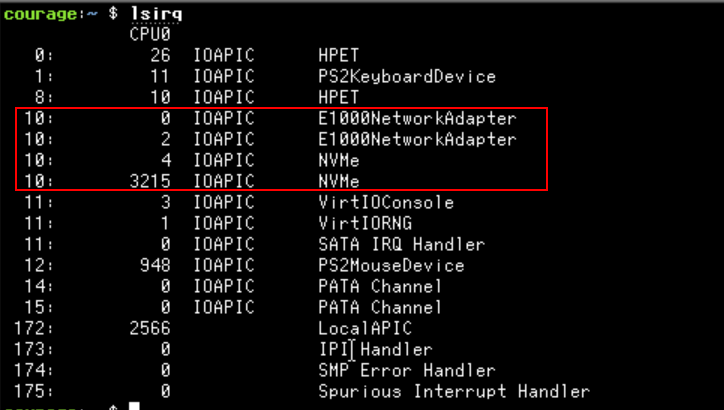
<p>The following image shows how E1000NetworkAdapter and NVMe device are
sharing the same interrupt line (10) when using the traditional pin-based
interrupts:</p>

<table>
  <thead>
    <tr>
      <th style="text-align: center"><img src="/assets/MSI/lsirq-IOAPIC.png" alt="IOAPIC \label{classdiag}" /></th>
    </tr>
  </thead>
  <tbody>
    <tr>
      <td style="text-align: center">E1000NetworkAdapter and NVMe sharing the same interrupt line</td>
    </tr>
  </tbody>
</table>

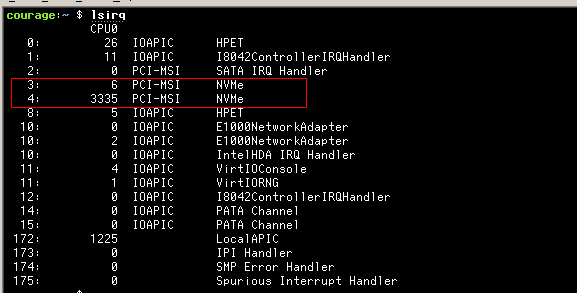
<p>MSI can solve this problem by not sharing the same interrupt line.
I decided add support for MSI and MSIx interrupt mechanism as SerenityOS
was lacking those features.</p>

<p>In pin-based interrupt mechanism, the driver reads the interrupt line
field in the PCI header and uses that to program the interrupt handler.
For MSI based interrupts, the driver has to program the device with an
IRQ number that it wants the device to trigger when an interrupt occurs.
As serenity always used pin-based interrupts, new APIs were introduced to
make MSI(x) work.</p>

<p>The PRs can be found here:</p>

<p><a href="https://github.com/SerenityOS/serenity/pull/18580">Pull Request: MSIx</a></p>

<p><a href="https://github.com/SerenityOS/serenity/pull/18732">Pull Request: MSI</a>.
Check out MSIx PR before seeing this PR as I added MSIx support first.</p>

<table>
  <thead>
    <tr>
      <th style="text-align: center"><img src="/assets/MSI/MSIlsirq.png" alt="MSI \label{classdiag}" /></th>
    </tr>
  </thead>
  <tbody>
    <tr>
      <td style="text-align: center">NVMe using MSIx without sharing the interrupt line</td>
    </tr>
  </tbody>
</table>

<h4 id="additional-resources">Additional resources:</h4>
<p>Please check out the <a href="https://wiki.osdev.org/PCI#Message_Signaled_Interrupts">osdev</a>
article and the <a href="https://cdrdv2.intel.com/v1/dl/getContent/671200">intel software manual</a>
chapter 11 for more information. Even though they were good documentation, I missed
some information when I was implementing this feature. I also used Linux
source code and <a href="https://github.com/search?q=repo%3Ahaiku%2Fhaiku%20msi&amp;type=code">Haiku OS</a>
source code to reverse engineer how this feature is implemented.</p>

<p>Happy Hacking!</p>]]></content><author><name>Pankaj Raghav</name></author><category term="os" /><category term="serenityos" /><summary type="html"><![CDATA[Traditional PCI devices use a shared interrupt line to signal the CPU when they need attention. This can lead to performance issues as all the devices that are connected to the interrupt line need to invoke their interrupt handler. Message Signalled Interrupts (MSI) was developed to address these problems by providing a more efficient and scalable way of handling interrupts.]]></summary></entry><entry><title type="html">Impact of Indirection Unit on Write Amplification in SSDs</title><link href="https://blog.pankajraghav.com/2023/12/18/IU-WAF.html" rel="alternate" type="text/html" title="Impact of Indirection Unit on Write Amplification in SSDs" /><published>2023-12-18T00:00:00+00:00</published><updated>2023-12-18T00:00:00+00:00</updated><id>https://blog.pankajraghav.com/2023/12/18/IU-WAF</id><content type="html" xml:base="https://blog.pankajraghav.com/2023/12/18/IU-WAF.html"><![CDATA[<p>Developers typically think of SSDs as a black box which will store any
IO that is coming its way into a non-volatile memory (such as NAND).
Even though the part about storing the IO to the non-volatile memory is true,
the way it achieves it depends on various implementation details and
parameters. These parameters can have different side effects on
performance, endurance, etc.</p>

<p>One such parameter we will explore in this article is the Indirection
Unit and how it impacts the device’s endurance based on Write Amplification.</p>

<p>First, let us see what is Write Amplification and then discuss about
Indirection Unit and its impact.</p>

<h2 id="write-amplification">Write Amplification:</h2>
<p>Write Amplification (WA) happens in SSD when the actual
amount of written physical data is more than the amount of logical data 
that is written by the host.</p>

<p>WAF is the mathematical representation of this phenomenon, describing
the ratio of <strong>physical writes to logical writes.</strong> Let us say the host
wrote 4KB, and the SSD has to write 16KB to accommodate that operation;
then the WAF will be <strong>4</strong>. WAF has a direct impact on the <strong>lifetime of the SSDs</strong>
as more WAF leads to more writes to the underlying media.</p>

<p>WAF on the device can be calculated as follows:</p>
<div class="language-plaintext highlighter-rouge"><div class="highlight"><pre class="highlight"><code># io_len: size of the IO from the host
# io_extra: extra IO incurred by the SSD for a given io_len

WAF = (io_len + io_extra) / io_len
</code></pre></div></div>

<p>End-End WAF is a culmination of different WAFs<sup>0</sup>:</p>
<div class="language-plaintext highlighter-rouge"><div class="highlight"><pre class="highlight"><code>WAFTotal = WAF_App * WAF_Device
# Splitting WAF_Device further:
WAFTotal = WAF_App * WAF_SSD * WAF_IU
</code></pre></div></div>

<p>WAF contribution happens because of different factors. We will look
into the impact of the Indirection unit(<code class="language-plaintext highlighter-rouge">WAF_IU</code>) on WAF as part of this article.</p>

<h2 id="indirection-unit">Indirection Unit:</h2>

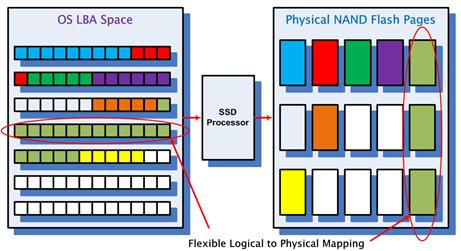
<p>SSDs maintain a Logical to Physical mapping(L2P) table to map a <strong>logical
block</strong> to an underlying <strong>physical</strong> NAND block in its RAM(device RAM and not host RAM<sup>1</sup>).
Logically contiguous blocks do not translate to physical contiguous blocks. This is similar
to how virtual memory works in an Operating system.</p>

<p>If the mapping granularity is 4KB, then a 4KB logical block
corresponds to a 4KB physical block. Whenever a block is written to the
device, a new mapping is created in RAM, and it is used again to find the
corresponding physical block when a read happens.</p>

<table>
  <thead>
    <tr>
      <th style="text-align: center"><img src="/assets/IU-WAF/SSD.jpg" alt="SSD \label{classdiag}" width="500" /></th>
    </tr>
  </thead>
  <tbody>
    <tr>
      <td style="text-align: center"><em>SSD Logical to Physical mapping</em></td>
    </tr>
  </tbody>
</table>

<p>Having a mapping table will incur some RAM costs for the device. Assuming
a 1:1 L2P with 4KB Logical block size will require at least 256MB of
RAM for an SSD of size 256GB.</p>

<div class="language-plaintext highlighter-rouge"><div class="highlight"><pre class="highlight"><code>4KB LBA size in 256 GB SSD = 64M entries (256GB / 4KB)
Each entry could be 32 bits.
64M * 4 bytes = 256 MB
</code></pre></div></div>

<p>The amount of RAM is directly proportional to the size of the SSD.
Extrapolating the same math for 64TB SSD will result in having a
whooping <strong>64GB of RAM</strong> in the device to hold the mapping table.</p>

<p>High-capacity SSDs have already started to appear in the market<sup>3</sup>,
and device vendors need to use new techniques to keep the RAM under
control for mapping table to reduce cost, etc.</p>

<p>One technique that device vendors actively use to reduce RAM
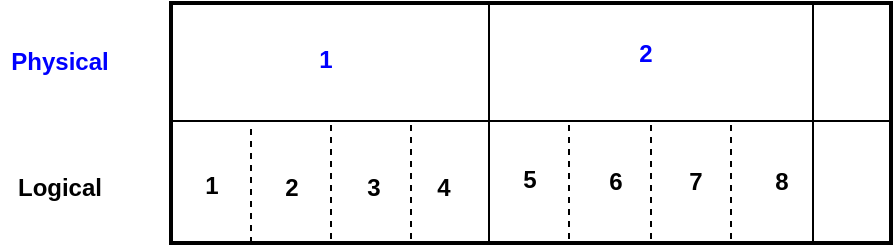
footprint is to increase the mapping ratio or the <strong>Indirection Unit</strong>. Instead of having 1:1
mapping, device could have n:1 L2P mapping, where n &gt; 1. RAM footprint
is inversely proportional to <code class="language-plaintext highlighter-rouge">n</code> i.e., multiple logical blocks could
have 1 physical mapping as follows:</p>

<table>
  <thead>
    <tr>
      <th style="text-align: center"><img src="/assets/IU-WAF/rotate_IU.png" alt="IU L2P:\label{classdiag}" /></th>
    </tr>
  </thead>
  <tbody>
    <tr>
      <td style="text-align: center"><em>Mapping table with 16k Indirection Unit (4:1)</em></td>
    </tr>
  </tbody>
</table>

<p>Even though increasing the logical block size above 4KB is an option,
backward compatibility with the host will not make the transition
easy<sup>4</sup>. Solidigm’s high-capacity drive has an Indirection Unit
of 16k for an SSD with 61.44TB capacity<sup>3</sup>.</p>

<p>The following section discusses the impact of increasing Indirection
Unit(IU) on WAF.</p>

<h2 id="indirection-unit-impact-on-waf">Indirection Unit impact on WAF:</h2>
<p>As increasing the IU is inevitable for high-capacity SSDs, evaluating its
effects on WAF is essential. As multiple LBAs map to a single
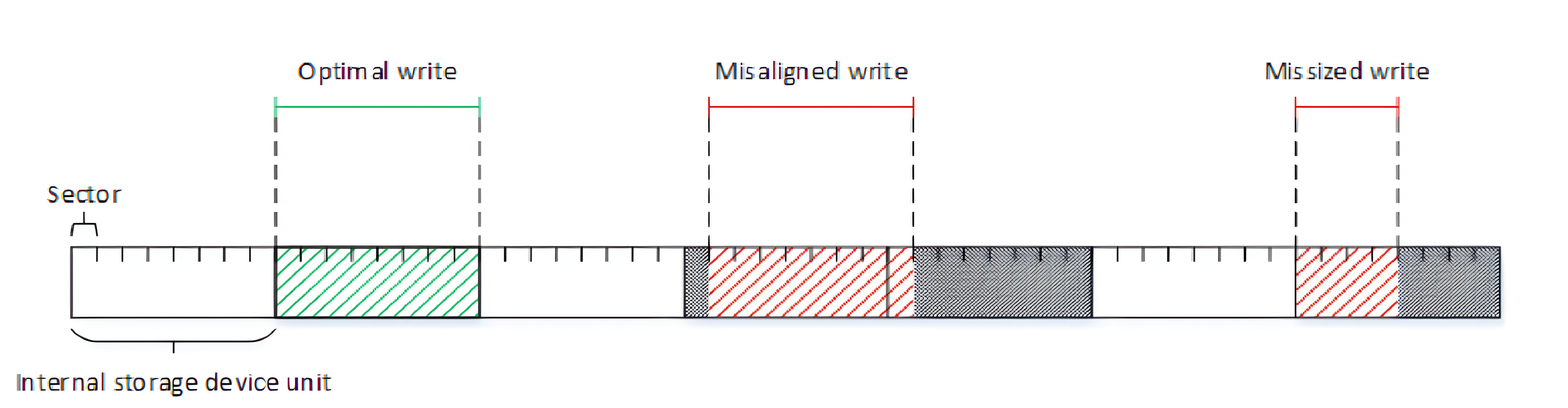
physical block, IO writes that are smaller than IU will incur a
Read-Modify-Write(RMW) that leads to WAF. RMW has to read the old data,
merge the new data, and write it back to the media.</p>

<table>
  <thead>
    <tr>
      <th style="text-align: center"><img src="/assets/IU-WAF/IU.png" alt="RMW:\label{classdiag}" /></th>
    </tr>
  </thead>
  <tbody>
    <tr>
      <td style="text-align: center"><em>Read-Modify-Write operation<sup>2</sup></em></td>
    </tr>
  </tbody>
</table>

<p>Optimal write should <strong>align and be a multiple of IUs</strong>.
RMW negatively impacts the performance and lifetime of the SSD due to extra
writes incurred.</p>

<h2 id="quantifying-iu-waf">Quantifying IU WAF:</h2>
<p><code class="language-plaintext highlighter-rouge">WAF_IU</code> can be easily quantified by monitoring the IO write patterns coming
from the host.</p>

<p>On a 16k IU drive, io spanning from offset 12k to 32k (<code class="language-plaintext highlighter-rouge">io_len</code> of 20k)
will incur an <code class="language-plaintext highlighter-rouge">extra_io</code> of <code class="language-plaintext highlighter-rouge">12k</code> due to RMW as explained before. The
resulting <code class="language-plaintext highlighter-rouge">WAF_IU</code> is <strong>1.6</strong>. ASCII art explaining the workload:</p>

<div class="language-plaintext highlighter-rouge"><div class="highlight"><pre class="highlight"><code>0        4        8       12       16       20       24       28       32
|--------|--------|--------|--------|--------|--------|--------|--------|..  LBA space
                           &lt;--------------------------------------------&gt;    io_len
&lt;-#######################-&gt;                                                  extra_io
&lt;-----------------------------------------------------------------------&gt;    total_io
</code></pre></div></div>

<p><code class="language-plaintext highlighter-rouge">WAF_IU</code> can be calculated as follows(code gist <a href="https://github.com/Panky-codes/nvme-waf-rs/blob/e1eee2e396dbbf71561ff1f6de62c68cb0576624/src/lib.rs#L12">here</a>):</p>

<div class="language-plaintext highlighter-rouge"><div class="highlight"><pre class="highlight"><code># io_offset: IO offset from the host
# io_len: size of the IO from the host
# IU: Indirection Unit

total_io = (round_up((io_offset + io_len), IU) - round_down((io_offset), IU))

WAF = total_io / io_len
</code></pre></div></div>

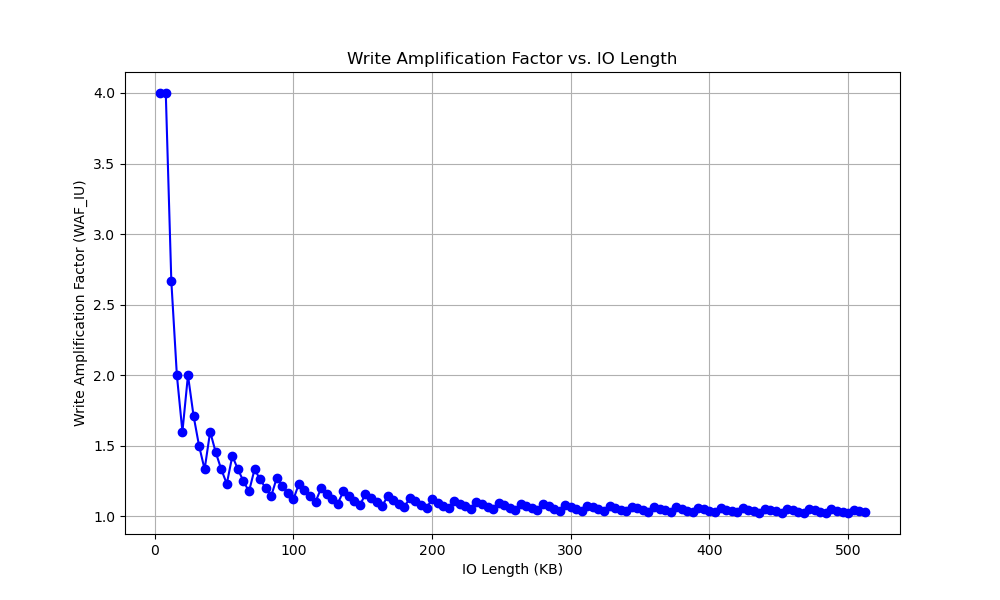
<p>One interesting observation that the above formula indicates that the
<strong>extra IO</strong> due to IU is caused due to the <strong>unalignment</strong> in the <strong>either ends</strong> 
of <strong>an IO</strong>.</p>

<table>
  <thead>
    <tr>
      <th style="text-align: center"><img src="/assets/IU-WAF/IU_WAF_len.png" alt="RMW:\label{classdiag}" /></th>
    </tr>
  </thead>
  <tbody>
    <tr>
      <td style="text-align: center"><em>Worst case WAF_IU for different IO length</em></td>
    </tr>
  </tbody>
</table>

<p>The plot above shows the <strong>worst case WAF_IU</strong> for different IO length
on a <strong>16k IU device.</strong> If the <strong>IO size</strong> from the host much
<strong>greater</strong> than the <strong>IU</strong>, then the impact on WAF due to IU drastically
<strong>reduces</strong>. The <strong>biggest impact</strong> on WAF due to IU happens when
the <strong>IO size</strong> is <strong>smaller</strong> than the <strong>IU</strong> of the device.</p>

<h2 id="takeaways">Takeaways:</h2>
<ul>
  <li>Indirection units will increase to <strong>reduce cost</strong> for high-capacity SSDs.</li>
  <li>The indirection unit of the device has an impact on <strong>total WAF</strong>.</li>
  <li>Impact of Indirection Unit on WAF is <strong>highest</strong> when <strong>IO size is smaller</strong>
than the Indirection unit and <strong>lowest</strong> when the <strong>IO size is higher</strong> than
the Indirection unit.</li>
  <li>The host can <strong>avoid</strong> the WAF due to IU by <strong>aligning</strong> and sending <strong>IO writes</strong>
that are a <strong>multiple of IU</strong> to the device.</li>
</ul>

<h4 id="references">References:</h4>
<p><sup>0</sup> <a href="https://www.micron.com/about/blog/2023/october/real-life-workloads-allow-more-efficient-data-granularity-and-enable-very-large-ssd-capacities">Real Life workloads allow more efficient data granularity and enable very large SSD capacities</a></p>

<p><sup>1</sup> <a href="https://www.servethehome.com/what-are-host-memory-buffer-or-hmb-nvme-ssds/">There are HMB SSDs which store the L2P table in Host RAM but they are not yet widely used</a></p>

<p><sup>2</sup> <a href="https://cdrdv2-public.intel.com/605724/Achieving_Optimal_Perf_IU_SSDs-338395-003US.pdf">Achieving Optimal Performance &amp; Endurance on Coarse Indirection Unit SSDs</a></p>

<p><sup>3</sup><a href="https://www.tomshardware.com/news/solidigm-launches-61tb-pcie-ssd">Solidigm Launches 61.44TB PCIe SSD</a></p>

<p><sup>4</sup><a href="https://www.seagate.com/gb/en/blog/advanced-format-4k-sector-hard-drives-master-ti/">Transition to Advanced Format 4K Sector Hard Drives</a></p>]]></content><author><name>Pankaj Raghav</name></author><category term="kernel" /><category term="nvme" /><category term="flash" /><category term="lbs" /><summary type="html"><![CDATA[Developers typically think of SSDs as a black box which will store any IO that is coming its way into a non-volatile memory (such as NAND). Even though the part about storing the IO to the non-volatile memory is true, the way it achieves it depends on various implementation details and parameters. These parameters can have different side effects on performance, endurance, etc.]]></summary></entry><entry><title type="html">Writing a RAM-backed block driver in the Linux Kernel</title><link href="https://blog.pankajraghav.com/2022/11/30/BLKRAM.html" rel="alternate" type="text/html" title="Writing a RAM-backed block driver in the Linux Kernel" /><published>2022-11-30T00:00:00+00:00</published><updated>2022-11-30T00:00:00+00:00</updated><id>https://blog.pankajraghav.com/2022/11/30/BLKRAM</id><content type="html" xml:base="https://blog.pankajraghav.com/2022/11/30/BLKRAM.html"><![CDATA[<p>Linux block layer stack is a complicated beast as it needs to cater to all
use cases, but it also allows a block device driver writer to focus
only on dealing with the complexity of the device. This article explores a
simple RAM-backed block device driver module in the Linux Kernel. The
main idea of this article is to show the framework the block layer
provides to write a device driver in the kernel land.</p>

<p>A simple block driver: <code class="language-plaintext highlighter-rouge">blkram</code> that lives in the RAM will be
written from scratch as a part of this article. I
decided to do this to focus on the block layer stack with a practical
example without having to deal with the complexity of
an actual block device such as a SATA or an NVMe drive. Maybe in the
future, I will explore writing an NVMe driver from scratch in the kernel.</p>

<p>Linux Block layer is constantly being innovated and modified. As there
are no API/ABI guarantees within the kernel, the code that is shown in
this article which is based on Linux 6.1.0-rc6 might be outdated in a year.</p>

<h1 id="linux-block-layer">Linux Block layer</h1>
<p>The Linux Block layer introduced <code class="language-plaintext highlighter-rouge">blk-mq</code> framework around 2013. All the
new block drivers are required to use this framework. Some drivers still use older frameworks
in the kernel, but most of the drivers have been modified to be consistent.
The following picture taken from <a href="https://kernel.dk/blk-mq.pdf">paper</a> shows
how the block layer stack with <code class="language-plaintext highlighter-rouge">blk-mq</code> works<sup>1</sup></p>

<table>
  <thead>
    <tr>
      <th style="text-align: center"><img src="/assets/blkram/blk-mq.png" alt="blk-mq \label{classdiag}" width="500" /></th>
    </tr>
  </thead>
  <tbody>
    <tr>
      <td style="text-align: center"><em>Block layer stack</em></td>
    </tr>
  </tbody>
</table>

<p>The <code class="language-plaintext highlighter-rouge">blk-mq</code> uses a two-layer multi-queue design where software queues
based on the number of cpu cores are mapped to a hardware queue/queues.
The primary rationale behind this design is to allow a block device driver
to fully use the multiple hardware queues present in modern
devices such as NVMe SSD. Older devices with a single queue can map all the
software queues to a single hardware queue. The <code class="language-plaintext highlighter-rouge">blkram</code> driver will
also use a single hardware queue. The reader can find more information
about <code class="language-plaintext highlighter-rouge">blk-mq</code> from this <a href="https://kernel.dk/blk-mq.pdf">paper</a> and this
<a href="https://lwn.net/Articles/552904/">LWN article</a>.</p>

<h1 id="blkram-driver">BLKRAM driver</h1>

<p><code class="language-plaintext highlighter-rouge">blkram</code> is an out-of-tree kernel module using the <code class="language-plaintext highlighter-rouge">blk-mq</code> framework and do read &amp; writes
in the memory(RAM) that will be written as a part of this article.
The code can be found here on <a href="https://github.com/Panky-codes/blkram">Github</a>.</p>

<h2 id="module">Module:</h2>
<p>Before talking about the initialization, we need to talk about a
kernel module. <code class="language-plaintext highlighter-rouge">module_init</code> and <code class="language-plaintext highlighter-rouge">module_exit</code> needs to be defined that
are automatically called when a module is loaded and unloaded
respectively:</p>

<div class="language-c highlighter-rouge"><div class="highlight"><pre class="highlight"><code><span class="n">module_init</span><span class="p">(</span><span class="n">blk_ram_init</span><span class="p">);</span>
<span class="n">module_exit</span><span class="p">(</span><span class="n">blk_ram_exit</span><span class="p">);</span>
</code></pre></div></div>

<p>To store the relevant information of the driver, a new structure
<code class="language-plaintext highlighter-rouge">blk_ram_dev</code> is introduced, which has the following members:</p>

<div class="language-c highlighter-rouge"><div class="highlight"><pre class="highlight"><code><span class="k">struct</span> <span class="n">blk_ram_dev_t</span> <span class="p">{</span>
	<span class="n">sector_t</span> <span class="n">capacity</span><span class="p">;</span>
	<span class="n">u8</span> <span class="o">*</span><span class="n">data</span><span class="p">;</span>
	<span class="k">struct</span> <span class="n">blk_mq_tag_set</span> <span class="n">tag_set</span><span class="p">;</span>
	<span class="k">struct</span> <span class="n">gendisk</span> <span class="o">*</span><span class="n">disk</span><span class="p">;</span>
<span class="p">};</span>
</code></pre></div></div>

<p>The <code class="language-plaintext highlighter-rouge">capacity</code> holds the capacity of the block device in sectors (512
bytes), and <code class="language-plaintext highlighter-rouge">data</code> will contain the pointer to the actual block of memory
backing the block device. The <code class="language-plaintext highlighter-rouge">blk_mq_tag_set</code> and <code class="language-plaintext highlighter-rouge">gendisk</code>
structure will be explained in more depth later.</p>

<p>The capacity/size of the driver is exported as a module parameter, and it can
be set while loading the module:</p>

<div class="language-c highlighter-rouge"><div class="highlight"><pre class="highlight"><code><span class="c1">// To change the default: insmod blkram.ko capacity_mb=80</span>
<span class="kt">unsigned</span> <span class="kt">long</span> <span class="n">capacity_mb</span> <span class="o">=</span> <span class="mi">40</span><span class="p">;</span>
<span class="n">module_param</span><span class="p">(</span><span class="n">capacity_mb</span><span class="p">,</span> <span class="n">ulong</span><span class="p">,</span> <span class="mo">0644</span><span class="p">);</span>
<span class="n">MODULE_PARM_DESC</span><span class="p">(</span><span class="n">capacity_mb</span><span class="p">,</span> <span class="s">"capacity of the block device in MB"</span><span class="p">);</span>
</code></pre></div></div>

<p>As this driver is not associated with a lower-level driver such as
PCI, a pointer to the <code class="language-plaintext highlighter-rouge">struct blk_ram_dev_t</code> needs to be stored as a
static variable in the module:</p>

<div class="language-c highlighter-rouge"><div class="highlight"><pre class="highlight"><code><span class="k">static</span> <span class="k">struct</span> <span class="n">blk_ram_dev_t</span> <span class="o">*</span><span class="n">blk_ram_dev</span> <span class="o">=</span> <span class="nb">NULL</span><span class="p">;</span>
</code></pre></div></div>
<h2 id="initialization">Initialization:</h2>

<p>The initialization code of the driver goes under the <code class="language-plaintext highlighter-rouge">blk_ram_init</code>
function.</p>

<p>The <code class="language-plaintext highlighter-rouge">register_blkdev</code> function is first called to get a major number for
the block device. This is an optional function to call. We store the
major number as a <code class="language-plaintext highlighter-rouge">static</code> module parameter as it will be used again in
<code class="language-plaintext highlighter-rouge">blk_ram_exit</code> function to clean up.</p>

<p>Memory is allocated for the <code class="language-plaintext highlighter-rouge">struct blk_ram_dev_t</code> using <code class="language-plaintext highlighter-rouge">kzalloc</code>.
<code class="language-plaintext highlighter-rouge">kzalloc</code> allocates the memory in RAM and initializes it with zero
(similar to <code class="language-plaintext highlighter-rouge">kmalloc</code> with <code class="language-plaintext highlighter-rouge">memset</code>(0)). After this, memory needs to be
allocated for the RAM memory backing the block device. A
default value of <code class="language-plaintext highlighter-rouge">40 MB</code> is chosen here.
<code class="language-plaintext highlighter-rouge">kvmalloc</code> is used to allocate that memory as the value is considerable.
<code class="language-plaintext highlighter-rouge">kvmalloc</code> function tries to allocate physically contiguous memory and
if that fails, then it allocates virtually contiguous memory which might
not be physically contiguous. Having a physically discontiguous memory
should not be an issue for this driver. Besides, the kernel does not
allow using <code class="language-plaintext highlighter-rouge">kmalloc</code> for requested capacity than a certain limit.<sup>3</sup></p>

<div class="language-c highlighter-rouge"><div class="highlight"><pre class="highlight"><code><span class="c1">// Omitted error handling</span>

<span class="n">blk_ram_dev</span> <span class="o">=</span> <span class="n">kzalloc</span><span class="p">(</span><span class="k">sizeof</span><span class="p">(</span><span class="k">struct</span> <span class="n">blk_ram_scratch_dev</span><span class="p">),</span> <span class="n">GFP_KERNEL</span><span class="p">);</span>
<span class="n">blk_ram_dev</span><span class="o">-&gt;</span><span class="n">data</span> <span class="o">=</span> <span class="n">kvmalloc</span><span class="p">(</span><span class="n">data_size_bytes</span><span class="p">,</span> <span class="n">GFP_KERNEL</span><span class="p">);</span>
<span class="p">...</span>
</code></pre></div></div>

<h2 id="setting-up-the-request-queue">Setting up the request queue:</h2>
<p><code class="language-plaintext highlighter-rouge">Request queue</code> must be configured before setting up the disk parameters. I think 
of <code class="language-plaintext highlighter-rouge">Request queue</code> as the data plane where the actual data is transferred to
the device and <code class="language-plaintext highlighter-rouge">disk</code> abstraction is the control plane(<code class="language-plaintext highlighter-rouge">struct gendisk</code>) of a block
device.</p>

<p><code class="language-plaintext highlighter-rouge">struct blk_mq_tag_set</code> is used by the block driver to configure
<code class="language-plaintext highlighter-rouge">request queue</code> with the number of hardware queues, queue depth, callbacks, etc. This
structure does a lot more than just store these parameters. It also
has <code class="language-plaintext highlighter-rouge">tags</code>, which track requests sent to a block device. The
code below sets up the <code class="language-plaintext highlighter-rouge">tag_set</code> data structure:</p>

<div class="language-c highlighter-rouge"><div class="highlight"><pre class="highlight"><code><span class="c1">// Omitted error handling</span>
<span class="n">memset</span><span class="p">(</span><span class="o">&amp;</span><span class="n">blk_ram_dev</span><span class="o">-&gt;</span><span class="n">tag_set</span><span class="p">,</span> <span class="mi">0</span><span class="p">,</span> <span class="k">sizeof</span><span class="p">(</span><span class="n">blk_ram_dev</span><span class="o">-&gt;</span><span class="n">tag_set</span><span class="p">));</span>
<span class="n">blk_ram_dev</span><span class="o">-&gt;</span><span class="n">tag_set</span><span class="p">.</span><span class="n">ops</span> <span class="o">=</span> <span class="o">&amp;</span><span class="n">blk_ram_mq_ops</span><span class="p">;</span>
<span class="n">blk_ram_dev</span><span class="o">-&gt;</span><span class="n">tag_set</span><span class="p">.</span><span class="n">queue_depth</span> <span class="o">=</span> <span class="mi">128</span><span class="p">;</span>
<span class="n">blk_ram_dev</span><span class="o">-&gt;</span><span class="n">tag_set</span><span class="p">.</span><span class="n">numa_node</span> <span class="o">=</span> <span class="n">NUMA_NO_NODE</span><span class="p">;</span>
<span class="n">blk_ram_dev</span><span class="o">-&gt;</span><span class="n">tag_set</span><span class="p">.</span><span class="n">flags</span> <span class="o">=</span> <span class="n">BLK_MQ_F_SHOULD_MERGE</span><span class="p">;</span>
<span class="n">blk_ram_dev</span><span class="o">-&gt;</span><span class="n">tag_set</span><span class="p">.</span><span class="n">cmd_size</span> <span class="o">=</span> <span class="mi">0</span><span class="p">;</span>
<span class="n">blk_ram_dev</span><span class="o">-&gt;</span><span class="n">tag_set</span><span class="p">.</span><span class="n">driver_data</span> <span class="o">=</span> <span class="n">blk_ram_dev</span><span class="p">;</span>
<span class="n">blk_ram_dev</span><span class="o">-&gt;</span><span class="n">tag_set</span><span class="p">.</span><span class="n">nr_hw_queues</span> <span class="o">=</span> <span class="mi">1</span><span class="p">;</span>

<span class="n">ret</span> <span class="o">=</span> <span class="n">blk_mq_alloc_tag_set</span><span class="p">(</span><span class="o">&amp;</span><span class="n">blk_ram_dev</span><span class="o">-&gt;</span><span class="n">tag_set</span><span class="p">);</span>
<span class="n">disk</span> <span class="o">=</span> <span class="n">blk_ram_dev</span><span class="o">-&gt;</span><span class="n">disk</span> <span class="o">=</span>
	<span class="n">blk_mq_alloc_disk</span><span class="p">(</span><span class="o">&amp;</span><span class="n">blk_ram_dev</span><span class="o">-&gt;</span><span class="n">tag_set</span><span class="p">,</span> <span class="n">blk_ram_dev</span><span class="p">);</span>

<span class="n">blk_queue_logical_block_size</span><span class="p">(</span><span class="n">disk</span><span class="o">-&gt;</span><span class="n">queue</span><span class="p">,</span> <span class="n">PAGE_SIZE</span><span class="p">);</span>
<span class="n">blk_queue_physical_block_size</span><span class="p">(</span><span class="n">disk</span><span class="o">-&gt;</span><span class="n">queue</span><span class="p">,</span> <span class="n">PAGE_SIZE</span><span class="p">);</span>
<span class="n">blk_queue_max_segments</span><span class="p">(</span><span class="n">disk</span><span class="o">-&gt;</span><span class="n">queue</span><span class="p">,</span> <span class="mi">32</span><span class="p">);</span>
</code></pre></div></div>
<p><code class="language-plaintext highlighter-rouge">tag_set.ops</code> provides the callbacks to <code class="language-plaintext highlighter-rouge">blk_mq</code>. One
important callback that needs to be set for this driver is <code class="language-plaintext highlighter-rouge">queue_rq</code>.
This callback is called whenever a request is ready to be processed by
the device driver. More about <code class="language-plaintext highlighter-rouge">queue_rq</code> later in the article.</p>

<p><code class="language-plaintext highlighter-rouge">tag_set.flags</code> is used to set certain <code class="language-plaintext highlighter-rouge">request queue</code> properties.
<code class="language-plaintext highlighter-rouge">BLK_MQ_F_SHOULD_MERGE</code> flag is set to let the block layer to merge
contiguous requests together:</p>

<div class="language-c highlighter-rouge"><div class="highlight"><pre class="highlight"><code><span class="k">if</span> <span class="p">(</span><span class="o">!</span><span class="p">(</span><span class="n">hctx</span><span class="o">-&gt;</span><span class="n">flags</span> <span class="o">&amp;</span> <span class="n">BLK_MQ_F_SHOULD_MERGE</span><span class="p">)</span> <span class="o">||</span>
    <span class="n">list_empty_careful</span><span class="p">(</span><span class="o">&amp;</span><span class="n">ctx</span><span class="o">-&gt;</span><span class="n">rq_lists</span><span class="p">[</span><span class="n">type</span><span class="p">]))</span>
	<span class="k">goto</span> <span class="n">out_put</span><span class="p">;</span>
<span class="p">...</span>
<span class="cm">/*
 * Reverse check our software queue for entries that we could
 * potentially merge with. Currently includes a hand-wavy stop
 * count of 8, to not spend too much time checking for merges.
 */</span>
<span class="k">if</span> <span class="p">(</span><span class="n">blk_bio_list_merge</span><span class="p">(</span><span class="n">q</span><span class="p">,</span> <span class="o">&amp;</span><span class="n">ctx</span><span class="o">-&gt;</span><span class="n">rq_lists</span><span class="p">[</span><span class="n">type</span><span class="p">],</span> <span class="n">bio</span><span class="p">,</span> <span class="n">nr_segs</span><span class="p">))</span>
	<span class="n">ret</span> <span class="o">=</span> <span class="nb">true</span><span class="p">;</span>
</code></pre></div></div>

<p><code class="language-plaintext highlighter-rouge">tag_set.nr_hw_queues</code> is an important parameter that is used to inform
the block layer about the number of hardware queues this device can
support. In the case of <code class="language-plaintext highlighter-rouge">blkram</code>, only one hardware queue is chosen. For
NVMe devices which can physically support multiple hardware queue,
<code class="language-plaintext highlighter-rouge">tag_set.nr_hw_queues</code> can be given a higher value and
<code class="language-plaintext highlighter-rouge">blk_mq_map_queues</code> can map SW queues to the HW queues.</p>

<p>A <code class="language-plaintext highlighter-rouge">tag_set</code> is allocated with <code class="language-plaintext highlighter-rouge">blk_mq_alloc_tag_set</code> call with the
respective parameters. A request queue can be created with the
corresponding <code class="language-plaintext highlighter-rouge">tag_set</code> by calling <code class="language-plaintext highlighter-rouge">blk_mq_alloc_disk</code> function. This
function only allocates a disk but does not “add” it to the system.
<code class="language-plaintext highlighter-rouge">struct gendisk</code> contains a reference to the request queue that can be
used to configure parameters such as <code class="language-plaintext highlighter-rouge">logical_block_size</code>,
<code class="language-plaintext highlighter-rouge">physical block size</code>, etc.(block settings can be explored in this file
<code class="language-plaintext highlighter-rouge">block/blk-settings.c</code>).</p>

<h2 id="setting-up-the-disk">Setting up the disk:</h2>
<p>The gendisk structure stores the relevant context about a block device with
its bookkeeping information such as name, major/minor number,
partitions, etc. The <code class="language-plaintext highlighter-rouge">struct gendisk</code> can be found in <code class="language-plaintext highlighter-rouge">blkdev.h</code>. As
mentioned earlier, one could think of it as the control plane of a block
device.</p>

<div class="language-c highlighter-rouge"><div class="highlight"><pre class="highlight"><code><span class="n">disk</span><span class="o">-&gt;</span><span class="n">major</span> <span class="o">=</span> <span class="n">major</span><span class="p">;</span>
<span class="n">disk</span><span class="o">-&gt;</span><span class="n">first_minor</span> <span class="o">=</span> <span class="n">minor</span><span class="p">;</span>
<span class="n">disk</span><span class="o">-&gt;</span><span class="n">minors</span> <span class="o">=</span> <span class="mi">1</span><span class="p">;</span>
<span class="n">snprintf</span><span class="p">(</span><span class="n">disk</span><span class="o">-&gt;</span><span class="n">disk_name</span><span class="p">,</span> <span class="n">DISK_NAME_LEN</span><span class="p">,</span> <span class="s">"blkram"</span><span class="p">,</span> <span class="n">minor</span><span class="p">);</span>
<span class="n">disk</span><span class="o">-&gt;</span><span class="n">fops</span> <span class="o">=</span> <span class="o">&amp;</span><span class="n">blk_ram_rq_ops</span><span class="p">;</span>
<span class="n">disk</span><span class="o">-&gt;</span><span class="n">flags</span> <span class="o">=</span> <span class="n">GENHD_FL_NO_PART</span><span class="p">;</span>
<span class="n">set_capacity</span><span class="p">(</span><span class="n">disk</span><span class="p">,</span> <span class="n">blk_ram_dev</span><span class="o">-&gt;</span><span class="n">capacity</span><span class="p">);</span>

<span class="n">ret</span> <span class="o">=</span> <span class="n">add_disk</span><span class="p">(</span><span class="n">disk</span><span class="p">);</span>
</code></pre></div></div>

<p>Major number identifies the driver associated with a device, and minor
identifies the exact device that belongs to the driver so that the
device can be differentiated. For example in block devices, different
partitions are given a different minor number, but the major number
will remain the same.</p>

<p>As it is just a simple block driver, I decided not to support any 
partitions. <code class="language-plaintext highlighter-rouge">GENHD_FL_NO_PART</code> flag is set to the disk to tell the block
layer not to scan for any partitions. Similarly, <code class="language-plaintext highlighter-rouge">minors</code> is set to 1
as there will be no partitions. Block layer code that checks for
<code class="language-plaintext highlighter-rouge">GENHD_FL_NO_PART</code> and skip scanning for partitions:</p>
<div class="language-c highlighter-rouge"><div class="highlight"><pre class="highlight"><code><span class="k">static</span> <span class="kt">int</span> <span class="nf">blk_add_partitions</span><span class="p">(</span><span class="k">struct</span> <span class="n">gendisk</span> <span class="o">*</span><span class="n">disk</span><span class="p">)</span>
<span class="p">{</span>
	<span class="k">if</span> <span class="p">(</span><span class="n">disk</span><span class="o">-&gt;</span><span class="n">flags</span> <span class="o">&amp;</span> <span class="n">GENHD_FL_NO_PART</span><span class="p">)</span>
		<span class="k">return</span> <span class="mi">0</span><span class="p">;</span>

	<span class="n">state</span> <span class="o">=</span> <span class="n">check_partition</span><span class="p">(</span><span class="n">disk</span><span class="p">);</span>
<span class="p">...</span>
</code></pre></div></div>
<p><code class="language-plaintext highlighter-rouge">disk-&gt;fops</code> contains all the callbacks for the block device that is
used to perform <code class="language-plaintext highlighter-rouge">open</code>, <code class="language-plaintext highlighter-rouge">release</code>, <code class="language-plaintext highlighter-rouge">ioctl</code>, etc. The following snippet
should be enough for the <code class="language-plaintext highlighter-rouge">blkram</code> driver as we don’t need to do anything
special:</p>
<div class="language-c highlighter-rouge"><div class="highlight"><pre class="highlight"><code><span class="k">static</span> <span class="k">const</span> <span class="k">struct</span> <span class="n">block_device_operations</span> <span class="n">blk_ram_rq_ops</span> <span class="o">=</span> <span class="p">{</span>
	<span class="p">.</span><span class="n">owner</span> <span class="o">=</span> <span class="n">THIS_MODULE</span><span class="p">,</span>
<span class="p">};</span>
</code></pre></div></div>

<p>Finally, calling <code class="language-plaintext highlighter-rouge">add_disk</code> should create a block device <code class="language-plaintext highlighter-rouge">/dev/blkram</code>.</p>

<h2 id="request-processing">Request processing:</h2>
<p><code class="language-plaintext highlighter-rouge">queue_rq</code> callback is called by the block layer to process a request by
the device driver. Typically, <code class="language-plaintext highlighter-rouge">queue_rq</code> callback is used by a driver to
send the commands to a device, and the command completion is notified by
an interrupt request. As this block driver is dealing with RAM, which has low
latency, requests can be completed synchronously in the <code class="language-plaintext highlighter-rouge">queue_rq</code>
callback.</p>

<div class="language-c highlighter-rouge"><div class="highlight"><pre class="highlight"><code><span class="k">static</span> <span class="n">blk_status_t</span> <span class="nf">blk_ram_queue_rq</span><span class="p">(...)</span>
<span class="p">{</span>
	<span class="n">loff_t</span> <span class="n">pos</span> <span class="o">=</span> <span class="n">blk_rq_pos</span><span class="p">(</span><span class="n">rq</span><span class="p">)</span> <span class="o">&lt;&lt;</span> <span class="n">SECTOR_SHIFT</span><span class="p">;</span>
	<span class="k">struct</span> <span class="n">bio_vec</span> <span class="n">bv</span><span class="p">;</span>
	<span class="k">struct</span> <span class="n">req_iterator</span> <span class="n">iter</span><span class="p">;</span>
	<span class="n">blk_status_t</span> <span class="n">err</span> <span class="o">=</span> <span class="n">BLK_STS_OK</span><span class="p">;</span>
        <span class="p">....</span>

	<span class="n">blk_mq_start_request</span><span class="p">(</span><span class="n">rq</span><span class="p">);</span>

	<span class="n">rq_for_each_segment</span><span class="p">(</span><span class="n">bv</span><span class="p">,</span> <span class="n">rq</span><span class="p">,</span> <span class="n">iter</span><span class="p">)</span> <span class="p">{</span>
		<span class="kt">unsigned</span> <span class="kt">int</span> <span class="n">len</span> <span class="o">=</span> <span class="n">bv</span><span class="p">.</span><span class="n">bv_len</span><span class="p">;</span>
		<span class="kt">void</span> <span class="o">*</span><span class="n">buf</span> <span class="o">=</span> <span class="n">page_address</span><span class="p">(</span><span class="n">bv</span><span class="p">.</span><span class="n">bv_page</span><span class="p">)</span> <span class="o">+</span> <span class="n">bv</span><span class="p">.</span><span class="n">bv_offset</span><span class="p">;</span>
		<span class="p">...</span>
		<span class="k">switch</span> <span class="p">(</span><span class="n">req_op</span><span class="p">(</span><span class="n">rq</span><span class="p">))</span> <span class="p">{</span>
		<span class="k">case</span> <span class="n">REQ_OP_READ</span><span class="p">:</span>
			<span class="n">memcpy</span><span class="p">(</span><span class="n">buf</span><span class="p">,</span> <span class="n">blkram</span><span class="o">-&gt;</span><span class="n">data</span> <span class="o">+</span> <span class="n">pos</span><span class="p">,</span> <span class="n">len</span><span class="p">);</span>
			<span class="k">break</span><span class="p">;</span>
		<span class="k">case</span> <span class="n">REQ_OP_WRITE</span><span class="p">:</span>
			<span class="n">memcpy</span><span class="p">(</span><span class="n">blkram</span><span class="o">-&gt;</span><span class="n">data</span> <span class="o">+</span> <span class="n">pos</span><span class="p">,</span> <span class="n">buf</span><span class="p">,</span> <span class="n">len</span><span class="p">);</span>
			<span class="k">break</span><span class="p">;</span>
		<span class="nl">default:</span>
			<span class="n">err</span> <span class="o">=</span> <span class="n">BLK_STS_IOERR</span><span class="p">;</span>
			<span class="k">goto</span> <span class="n">end_request</span><span class="p">;</span>
		<span class="p">}</span>
		<span class="n">pos</span> <span class="o">+=</span> <span class="n">len</span><span class="p">;</span>
	<span class="p">}</span>

<span class="nl">end_request:</span>
	<span class="n">blk_mq_end_request</span><span class="p">(</span><span class="n">rq</span><span class="p">,</span> <span class="n">err</span><span class="p">);</span>
	<span class="k">return</span> <span class="n">BLK_STS_OK</span><span class="p">;</span>
<span class="p">}</span>
</code></pre></div></div>
<p><code class="language-plaintext highlighter-rouge">blk_mq_start_request</code> is called first to inform the block layer that
the driver has started processing the request. This is important for the
block layer to do accounting and keep track of each request for a
potential timeout.</p>

<p><code class="language-plaintext highlighter-rouge">rq_for_each_segment</code> is used to iterate over all the segments in a
request and perform any operation on a <code class="language-plaintext highlighter-rouge">bio_vec</code> (block IO vector). Only read
and write are supported by the <code class="language-plaintext highlighter-rouge">blkram</code> driver. When the request is
<code class="language-plaintext highlighter-rouge">REQ_OP_READ</code>, then a <code class="language-plaintext highlighter-rouge">memcpy</code> is performed from the <code class="language-plaintext highlighter-rouge">data</code> (backing
store of this block device) to the page given the <code class="language-plaintext highlighter-rouge">bio_vec</code>, and vice
versa for <code class="language-plaintext highlighter-rouge">REQ_OP_WRITE</code>.</p>

<p><code class="language-plaintext highlighter-rouge">blk_mq_end_request</code> is called with the appropriate <code class="language-plaintext highlighter-rouge">err</code> to mark that
the request is now completed. In NVMe devices, this function is called as a part of the
interrupt request when the device signals its completion of a command.</p>

<h2 id="testing">Testing:</h2>
<p>The driver is now ready to be tested. The module can be loaded as
follows:</p>
<div class="language-shell highlighter-rouge"><div class="highlight"><pre class="highlight"><code><span class="nv">$ </span>insmod blkram.ko <span class="nv">capacity_mb</span><span class="o">=</span>80
<span class="nv">$ </span>lsblk | <span class="nb">grep </span>blkram
blkram  253:0    0   80M  0 disk
</code></pre></div></div>

<p>A quick and easy way to test if read and write is working is through
<a href="https://github.com/axboe/fio">fio</a>. Install <code class="language-plaintext highlighter-rouge">fio</code> and run the following
command:</p>
<div class="language-shell highlighter-rouge"><div class="highlight"><pre class="highlight"><code><span class="nv">$ </span>fio <span class="nt">--name</span><span class="o">=</span>randomwrite  <span class="nt">--ioengine</span><span class="o">=</span>io_uring <span class="nt">--iodepth</span><span class="o">=</span>16 <span class="nt">--rw</span><span class="o">=</span>randwrite <span class="se">\</span>
                 <span class="nt">--size</span><span class="o">=</span>80M <span class="nt">--verify</span><span class="o">=</span>crc32 <span class="nt">--filename</span><span class="o">=</span>/dev/blkram
randomwrite: <span class="o">(</span><span class="nv">g</span><span class="o">=</span>0<span class="o">)</span>: <span class="nv">rw</span><span class="o">=</span>randwrite, <span class="nv">bs</span><span class="o">=(</span>R<span class="o">)</span> 4096B-4096B, <span class="o">(</span>W<span class="o">)</span> 4096B-4096B, <span class="o">(</span>T<span class="o">)</span> 4096B-4096B, <span class="nv">ioengine</span><span class="o">=</span>io_uring, <span class="nv">iodepth</span><span class="o">=</span>16
fio-3.31-8-g7a7bc
Starting 1 process

randomwrite: <span class="o">(</span><span class="nv">groupid</span><span class="o">=</span>0, <span class="nb">jobs</span><span class="o">=</span>1<span class="o">)</span>: <span class="nv">err</span><span class="o">=</span> 0: <span class="nv">pid</span><span class="o">=</span>968: Mon Dec  5 18:23:19 2022
  <span class="nb">read</span>: <span class="nv">IOPS</span><span class="o">=</span>62.1k, <span class="nv">BW</span><span class="o">=</span>242MiB/s <span class="o">(</span>254MB/s<span class="o">)(</span>80.0MiB/330msec<span class="o">)</span>
    slat <span class="o">(</span>usec<span class="o">)</span>: <span class="nv">min</span><span class="o">=</span>6, <span class="nv">max</span><span class="o">=</span>195, <span class="nv">avg</span><span class="o">=</span> 7.80, <span class="nv">stdev</span><span class="o">=</span> 2.08
    clat <span class="o">(</span>usec<span class="o">)</span>: <span class="nv">min</span><span class="o">=</span>8, <span class="nv">max</span><span class="o">=</span>444, <span class="nv">avg</span><span class="o">=</span>241.21, <span class="nv">stdev</span><span class="o">=</span>10.61
     lat <span class="o">(</span>usec<span class="o">)</span>: <span class="nv">min</span><span class="o">=</span>15, <span class="nv">max</span><span class="o">=</span>452, <span class="nv">avg</span><span class="o">=</span>249.01, <span class="nv">stdev</span><span class="o">=</span>10.85
     ....
  write: <span class="nv">IOPS</span><span class="o">=</span>78.8k, <span class="nv">BW</span><span class="o">=</span>308MiB/s <span class="o">(</span>323MB/s<span class="o">)(</span>80.0MiB/260msec<span class="o">)</span><span class="p">;</span> 0 zone resets
    slat <span class="o">(</span>usec<span class="o">)</span>: <span class="nv">min</span><span class="o">=</span>9, <span class="nv">max</span><span class="o">=</span>194, <span class="nv">avg</span><span class="o">=</span>12.22, <span class="nv">stdev</span><span class="o">=</span> 5.38
    clat <span class="o">(</span>usec<span class="o">)</span>: <span class="nv">min</span><span class="o">=</span>20, <span class="nv">max</span><span class="o">=</span>1165, <span class="nv">avg</span><span class="o">=</span>190.17, <span class="nv">stdev</span><span class="o">=</span>68.66
     lat <span class="o">(</span>usec<span class="o">)</span>: <span class="nv">min</span><span class="o">=</span>31, <span class="nv">max</span><span class="o">=</span>1176, <span class="nv">avg</span><span class="o">=</span>202.39, <span class="nv">stdev</span><span class="o">=</span>73.00
     ....
   bw <span class="o">(</span>  KiB/s<span class="o">)</span>: <span class="nv">min</span><span class="o">=</span>163840, <span class="nv">max</span><span class="o">=</span>163840, <span class="nv">per</span><span class="o">=</span>52.00%, <span class="nv">avg</span><span class="o">=</span>163840.00, <span class="nv">stdev</span><span class="o">=</span> 0.00, <span class="nv">samples</span><span class="o">=</span>1
   iops        : <span class="nv">min</span><span class="o">=</span>40960, <span class="nv">max</span><span class="o">=</span>40960, <span class="nv">avg</span><span class="o">=</span>40960.00, <span class="nv">stdev</span><span class="o">=</span> 0.00, <span class="nv">samples</span><span class="o">=</span>1
  lat <span class="o">(</span>usec<span class="o">)</span>   : <span class="nv">10</span><span class="o">=</span>0.01%, <span class="nv">50</span><span class="o">=</span>0.01%, <span class="nv">100</span><span class="o">=</span>0.02%, <span class="nv">250</span><span class="o">=</span>89.26%, <span class="nv">500</span><span class="o">=</span>10.23%
  lat <span class="o">(</span>usec<span class="o">)</span>   : <span class="nv">750</span><span class="o">=</span>0.48%
  lat <span class="o">(</span>msec<span class="o">)</span>   : <span class="nv">2</span><span class="o">=</span>0.01%
  cpu          : <span class="nv">usr</span><span class="o">=</span>48.15%, <span class="nv">sys</span><span class="o">=</span>46.11%, <span class="nv">ctx</span><span class="o">=</span>1390, <span class="nv">majf</span><span class="o">=</span>0, <span class="nv">minf</span><span class="o">=</span>573
  IO depths    : <span class="nv">1</span><span class="o">=</span>0.1%, <span class="nv">2</span><span class="o">=</span>0.1%, <span class="nv">4</span><span class="o">=</span>0.1%, <span class="nv">8</span><span class="o">=</span>0.1%, <span class="nv">16</span><span class="o">=</span>99.9%, <span class="nv">32</span><span class="o">=</span>0.0%, <span class="o">&gt;=</span><span class="nv">64</span><span class="o">=</span>0.0%
     submit    : <span class="nv">0</span><span class="o">=</span>0.0%, <span class="nv">4</span><span class="o">=</span>100.0%, <span class="nv">8</span><span class="o">=</span>0.0%, <span class="nv">16</span><span class="o">=</span>0.0%, <span class="nv">32</span><span class="o">=</span>0.0%, <span class="nv">64</span><span class="o">=</span>0.0%, <span class="o">&gt;=</span><span class="nv">64</span><span class="o">=</span>0.0%
     <span class="nb">complete</span>  : <span class="nv">0</span><span class="o">=</span>0.0%, <span class="nv">4</span><span class="o">=</span>100.0%, <span class="nv">8</span><span class="o">=</span>0.0%, <span class="nv">16</span><span class="o">=</span>0.1%, <span class="nv">32</span><span class="o">=</span>0.0%, <span class="nv">64</span><span class="o">=</span>0.0%, <span class="o">&gt;=</span><span class="nv">64</span><span class="o">=</span>0.0%
     issued rwts: <span class="nv">total</span><span class="o">=</span>20480,20480,0,0 <span class="nv">short</span><span class="o">=</span>0,0,0,0 <span class="nv">dropped</span><span class="o">=</span>0,0,0,0
     latency   : <span class="nv">target</span><span class="o">=</span>0, <span class="nv">window</span><span class="o">=</span>0, <span class="nv">percentile</span><span class="o">=</span>100.00%, <span class="nv">depth</span><span class="o">=</span>16

Run status group 0 <span class="o">(</span>all <span class="nb">jobs</span><span class="o">)</span>:
   READ: <span class="nv">bw</span><span class="o">=</span>242MiB/s <span class="o">(</span>254MB/s<span class="o">)</span>, 242MiB/s-242MiB/s <span class="o">(</span>254MB/s-254MB/s<span class="o">)</span>, <span class="nv">io</span><span class="o">=</span>80.0MiB <span class="o">(</span>83.9MB<span class="o">)</span>, <span class="nv">run</span><span class="o">=</span>330-330msec
  WRITE: <span class="nv">bw</span><span class="o">=</span>308MiB/s <span class="o">(</span>323MB/s<span class="o">)</span>, 308MiB/s-308MiB/s <span class="o">(</span>323MB/s-323MB/s<span class="o">)</span>, <span class="nv">io</span><span class="o">=</span>80.0MiB <span class="o">(</span>83.9MB<span class="o">)</span>, <span class="nv">run</span><span class="o">=</span>260-260msec

Disk stats <span class="o">(</span><span class="nb">read</span>/write<span class="o">)</span>:
  blkram: <span class="nv">ios</span><span class="o">=</span>11148/661, <span class="nv">merge</span><span class="o">=</span>0/19819, <span class="nv">ticks</span><span class="o">=</span>18/1238, <span class="nv">in_queue</span><span class="o">=</span>1256, <span class="nv">util</span><span class="o">=</span>42.53%

</code></pre></div></div>
<p>The above fio command will send random writes to the device, and at the
end verifies (by reading) if the device contains what was written.</p>

<h1 id="conclusion">Conclusion:</h1>
<p>A simple RAM-backed block device driver was explored as a part of this
article. The main idea behind writing this is to understand the <code class="language-plaintext highlighter-rouge">blk-mq</code>
framework provided by the block layer stack and write a device driver
using it. There is a lot of knobs that <code class="language-plaintext highlighter-rouge">blk-mq</code> offers which is not
covered in this article that could be utilized to optimize the driver
depending on the device.</p>

<p>I highly recommend the reader to clone the example from 
<a href="https://github.com/Panky-codes/blkram">github</a> and play with it in QEMU.
I already have an article about using <a href="https://blog.pankajraghav.com/2022/11/08/QEMU-NVMe.html">QEMU for NVMe development</a>, and it can
be used to easily create a virtual machine with QEMU.
The best way to explore is by using the <code class="language-plaintext highlighter-rouge">trace-cmd</code><sup>2</sup> utility or just with debug prints in
the kernel to see how different <code class="language-plaintext highlighter-rouge">blk-settings</code> affect the request sent
to this device.</p>

<p>I hope you enjoyed the article. Happy Hacking!</p>

<p><sup>1</sup> LWN article about block layer <a href="https://lwn.net/Articles/736534/">part1</a> &amp; <a href="https://lwn.net/Articles/738449/">part2</a></p>

<p><sup>2</sup> Learning the linux kernel with tracing <a href="https://www.youtube.com/watch?v=JRyrhsx-L5Y">video</a></p>

<p><sup>3</sup> what happens when kmalloc is used instead of kvmalloc:</p>

<p>Kernel panics when <code class="language-plaintext highlighter-rouge">kmalloc</code> is used instead of <code class="language-plaintext highlighter-rouge">kvmalloc</code> for
40 MB of <code class="language-plaintext highlighter-rouge">data_size_bytes</code>:</p>

<div class="language-plaintext highlighter-rouge"><div class="highlight"><pre class="highlight"><code>WARNING: CPU: 0 PID: 3467 at mm/page_alloc.c:5527 __alloc_pages+0x48b/0x5a0
</code></pre></div></div>
<p><code class="language-plaintext highlighter-rouge">__alloc_pages+0x48b/0x5a0</code> corresponds to the following line in the
kernel:</p>
<div class="language-plaintext highlighter-rouge"><div class="highlight"><pre class="highlight"><code>$ addr2line --exe=vmlinux --functions __alloc_pages+0x48b
__alloc_pages
linux/mm/page_alloc.c:5527 (discriminator 9)
</code></pre></div></div>
<p>Looking at the code at <code class="language-plaintext highlighter-rouge">mm/page_alloc:5527</code>:</p>
<div class="language-c highlighter-rouge"><div class="highlight"><pre class="highlight"><code><span class="cp">#define MAX_ORDER 11
</span><span class="p">....</span>
<span class="p">....</span>
<span class="cm">/*
  * There are several places where we assume that the order value is sane
  * so bail out early if the request is out of bound.
  */</span>
 <span class="k">if</span> <span class="p">(</span><span class="n">WARN_ON_ONCE_GFP</span><span class="p">(</span><span class="n">order</span> <span class="o">&gt;=</span> <span class="n">MAX_ORDER</span><span class="p">,</span> <span class="n">gfp</span><span class="p">))</span>
         <span class="k">return</span> <span class="nb">NULL</span><span class="p">;</span>
</code></pre></div></div>
<p>Any request of kmalloc with order 11 or above: <code class="language-plaintext highlighter-rouge">2^10 * PAGE_SIZE (4096 for x86)</code>= 4 MB
will fail this check.</p>]]></content><author><name>Pankaj Raghav</name></author><category term="kernel" /><summary type="html"><![CDATA[Linux block layer stack is a complicated beast as it needs to cater to all use cases, but it also allows a block device driver writer to focus only on dealing with the complexity of the device. This article explores a simple RAM-backed block device driver module in the Linux Kernel. The main idea of this article is to show the framework the block layer provides to write a device driver in the kernel land.]]></summary></entry><entry><title type="html">QEMU setup for NVMe development</title><link href="https://blog.pankajraghav.com/2022/11/08/QEMU-NVMe.html" rel="alternate" type="text/html" title="QEMU setup for NVMe development" /><published>2022-11-08T00:00:00+00:00</published><updated>2022-11-08T00:00:00+00:00</updated><id>https://blog.pankajraghav.com/2022/11/08/QEMU-NVMe</id><content type="html" xml:base="https://blog.pankajraghav.com/2022/11/08/QEMU-NVMe.html"><![CDATA[<p>QEMU is an emulator that can be used during the development of an NVMe driver. It 
offers NVMe 1.4 spec-compliant controller emulation. The neat part about using QEMU
is that it only emulates the controller and not the device itself, thereby allowing the driver
writer to focus solely on writing a spec-compliant driver without initially worrying
about the quirks that come along with an actual NVMe device. On top of that, QEMU offers 
tracing capabilities, making debugging very easy during initial development. And, last but not
 least, an actual NVMe device is not needed for development, and the host machine will not 
be affected in any way during the development. That is enough marketing as to why QEMU is excellent
for NVMe driver development.</p>

<p><a href="https://github.com/OpenMPDK/vmctl">vmctl</a> will be used to set up the QEMU development 
environment. It makes life a bit easy by automating the creation and management of QEMU as one of the primary usecase it specifically targets is
NVMe development. However, it is not necessary to use this tool to create and manage QEMU. Vagrant with libvirt is a possible
alternative</p>

<p>If you already have a QEMU setup for Linux development, only a few lines of setup command are required. Please go ahead and skip <code class="language-plaintext highlighter-rouge">VMCTL</code> section, as I will cover 
that at the end of the article.</p>

<h2 id="vmctl">VMCTL:</h2>
<p>The official github page has an excellent README which should be good enough to get started. I will reiterate certain parts 
of the README in a different order and add a bit more context for readers who are entirely new to this topic.</p>

<p>Make sure to clone the official <a href="https://github.com/OpenMPDK/vmctl">repo</a> and make sure the vmctl is added to the path via a symlink as suggested in the official README. 
Before we use <code class="language-plaintext highlighter-rouge">vmctl</code>, a boot image needs to be created.</p>

<p>Here is an Ansible <a href="https://gist.github.com/Panky-codes/d5615e6146d83102a49fc8adee9908ec">role</a>
to automate the steps described in this article for readers who prefer IaC.</p>

<h3 id="ubuntu-boot-image">Ubuntu boot image</h3>
<p>Download a ubuntu cloud image from the official <a href="https://cloud-images.ubuntu.com">site</a>. Resize the
ubuntu image as follows:</p>
<div class="language-plaintext highlighter-rouge"><div class="highlight"><pre class="highlight"><code>&gt;$ qemu-img resize ubuntu-&lt;ver&gt;-server-cloudimg-amd64.img 8G
</code></pre></div></div>
<p>Create a new folder called <code class="language-plaintext highlighter-rouge">vms</code> to hold all the VM related data and copy the ubuntu qcow into a folder named <code class="language-plaintext highlighter-rouge">img</code> (inside <code class="language-plaintext highlighter-rouge">vms</code>) as <code class="language-plaintext highlighter-rouge">base.qcow2</code>.</p>
<div class="language-plaintext highlighter-rouge"><div class="highlight"><pre class="highlight"><code>&gt;$ mkdir -p vms/img
&gt;$ cp ubuntu-&lt;ver&gt;-server-cloudimg-amd64.img vms/img/base.qcow2
</code></pre></div></div>
<h4 id="cloud-init">cloud-init</h4>
<p>After creating a Ubuntu based qcow image, the image can be configured using cloud-init script provided by <code class="language-plaintext highlighter-rouge">vmctl</code>. 
Running this helps set some defaults that will be useful when we boot the system. Also we will set it up to accept ssh 
connections from our host by providing it our ssh public key.</p>
<div class="language-plaintext highlighter-rouge"><div class="highlight"><pre class="highlight"><code>&gt;$ ./vmctl/contrib/generate-cloud-config-seed.sh ~/.ssh/&lt;your-public-key-for-qemu&gt;.pub
&gt;$mv seed.img vms/img/
</code></pre></div></div>
<h3 id="using-vmctl-to-boot-the-image-in-qemu">Using vmctl to boot the image in QEMU</h3>
<p>The official repo provides a set of example configuration files to boot Linux with NVMe storage. One thing to note is that 
even though the guest OS running in QEMU sees an NVMe drive, QEMU only emulates the NVMe controller, but underneath, it uses the storage media 
of the host. For more details on how QEMU emulates the NVMe controller, do check out this <a href="https://www.youtube.com/watch?v=7w7d8GV5_B0">video</a> by the current 
maintainer of the QEMU NVMe subsystem.</p>

<p>Copy the relevant files to the <code class="language-plaintext highlighter-rouge">config</code> subfolder inside <code class="language-plaintext highlighter-rouge">vms</code> folder.</p>
<div class="language-plaintext highlighter-rouge"><div class="highlight"><pre class="highlight"><code>&gt;$ mkdir vms/config
&gt;$ cp vmctl/examples/vm/nvme.conf vms/config
&gt;$ cp vmctl/examples/vm/q35-base.conf vms/config
&gt;$ cp vmctl/examples/vm/common.conf vms/config
</code></pre></div></div>

<p>Add just one line <code class="language-plaintext highlighter-rouge">QEMU_PARAMS+=("-s")</code> in the nvme.conf file as follows:</p>
<div class="language-plaintext highlighter-rouge"><div class="highlight"><pre class="highlight"><code>_setup_nvme() {
# setup basevm
  _setup_q35_base

  QEMU_PARAMS+=("-s")
</code></pre></div></div>
<p>The reason to add <code class="language-plaintext highlighter-rouge">-s</code> option to <code class="language-plaintext highlighter-rouge">qemu</code> is to enable debugging with gdb from the host machine. 
This will be handy to do remote debugging with gdb as it opens up <code class="language-plaintext highlighter-rouge">port:1234</code> for that purpose.</p>

<p>Firstly, the image needs to be configured with the seed.img that was created. Run the following to do that:</p>
<div class="language-plaintext highlighter-rouge"><div class="highlight"><pre class="highlight"><code>&gt;vms$ vmctl -c nvme.conf run -c
</code></pre></div></div>
<p>Once the configuration is complete from the previous step, the image can be booted by running the following command:</p>
<div class="language-plaintext highlighter-rouge"><div class="highlight"><pre class="highlight"><code>&gt;vms$ vmctl -c nvme.conf run
</code></pre></div></div>
<p>Now check whether the build worked by <em>sshing</em> into the VM as follows from another terminal:</p>
<div class="language-plaintext highlighter-rouge"><div class="highlight"><pre class="highlight"><code>ssh -p 2222 'root@localhost'

</code></pre></div></div>
<p>Inside the VM, make sure that there is an NVMe driver attached to our VM by running <code class="language-plaintext highlighter-rouge">lsblk</code> inside the VM:</p>
<div class="language-plaintext highlighter-rouge"><div class="highlight"><pre class="highlight"><code>[root@archlinux ~]# lsblk
NAME    MAJ:MIN RM SIZE RO TYPE MOUNTPOINTS
vda     254:0    0   8G  0 disk
└─vda1  254:1    0   8G  0 part /
nvme0n1 259:0    0   1G  0 disk
</code></pre></div></div>
<p>As we can see, Linux detects the NVMe drive and creates a block device <code class="language-plaintext highlighter-rouge">nvme0n1</code>.</p>

<p>If you encounter any issues, ensure you are inside the <code class="language-plaintext highlighter-rouge">vms</code> folder. If you want
to run the command from a different folder, set the <code class="language-plaintext highlighter-rouge">VMCTL_VMROOT</code> environment
variable pointing to the <code class="language-plaintext highlighter-rouge">vms</code> directory.</p>
<h4 id="using-a-custom-kernel-and-tracing">Using a custom kernel and tracing</h4>
<p>We can use Linus’s tree to use the latest mainline kernel version. And
QEMU also has the option to use a custom kernel during boot. To compile
a custom kernel, do the following:</p>
<div class="language-plaintext highlighter-rouge"><div class="highlight"><pre class="highlight"><code>&gt;$ git clone https://github.com/torvalds/linux.git 
&gt;$ cd linux
&gt;$ make menuconfig
&gt;$ make -j$(nproc)
</code></pre></div></div>
<p>Grab a cup of coffee while the kernel builds.</p>

<p>Once the build is complete, run the vmctl tool by pointing to the kernel build dir as follows:</p>
<div class="language-plaintext highlighter-rouge"><div class="highlight"><pre class="highlight"><code>&gt;vms$ vmctl -c nvme.conf run -k &lt;path-to-linux-dir&gt;
</code></pre></div></div>
<p>It is also a good idea to enable pci_nvme tracing in QEMU to help with the debugging.</p>

<p>The <strong>final command</strong>, which does everything, is as follows:</p>
<div class="language-plaintext highlighter-rouge"><div class="highlight"><pre class="highlight"><code>&gt;vms$ vmctl -c nvme.conf run -t pci_nvme -k &lt;path-to-linux-dir&gt;

</code></pre></div></div>

<p>Note that vmctl uses a systemd service to mount the kernel directory from host,
enabling the use of modules compiled in the host to be consumed inside the Guest.
This is a nice feature to avoid building all modules into a single kernel binary,
thereby significantly reducing kernel build time when modifying a module. Also, some
test suites, such as <a href="https://github.com/osandov/blktests">blktest</a>, require some drivers
to be dynamically loadable modules.</p>

<p>To view the QEMU trace, run the following in another terminal:</p>
<div class="language-plaintext highlighter-rouge"><div class="highlight"><pre class="highlight"><code>&gt;vms$ vmctl -c nvme.conf log -f
</code></pre></div></div>
<p>Tmux could be used to run these commands in different panes in the same window.</p>

<h3 id="vfio-device-passthrough">VFIO device passthrough</h3>
<p>VFIO passthrough can be used to access the NVMe device from the Guest OS. 
VFIO-PCI module will pass the NVMe device to the Guest, and the Guest OS’s NVMe
driver can be used to talk to the device.</p>

<p>Pre and post hooks from vmctl config can be used to bind/unbind the respective
device before starting QEMU.
This <a href="https://null-src.com/posts/qemu-vfio-pci/post.php">article</a> explains the
setup needed to do vfio-pci passthrough.</p>

<p>The following pre hook will
detach the host’s NVMe driver from 01:00.0 PCI port and attach it to the vfio-pci
module before starting QEMU, and the post hook in <a href="https://github.com/OpenMPDK/vmctl/blob/master/examples/vm/nvme.conf">nvme.conf</a>
will restore the original state after exiting QEMU :</p>
<div class="language-plaintext highlighter-rouge"><div class="highlight"><pre class="highlight"><code>_pre() {
		# Pre hook to run before starting QEMU
	 
		# unbind 0000:01:00.0 from nvme kernel module
		echo '0000:01:00.0' &gt; /sys/bus/pci/drivers/nvme/unbind
	 
		# bind 0000:01:00.0 to vfio-pci kernel module
		echo '0000:01:00.0' &gt; /sys/bus/pci/drivers/vfio-pci/bind
	}
	 
_post() {
		# Post hook to run after exiting QEMU
	 
		# unbind 0000:01:00.0 from vfio-pci kernel module
		echo '0000:01:00.0' &gt; /sys/bus/pci/drivers/vfio-pci/unbind
	 
		# bind 0000:01:00.0 to xhci_hcd kernel module
		echo '0000:01:00.0' &gt; /sys/bus/pci/drivers/nvme/bind
	}
</code></pre></div></div>

<h2 id="without-using-vmctl">Without using VMCTL</h2>
<p>As mentioned before, vmctl tool makes life a bit easier to manage QEMU NVMe development. But it is an optional tool.</p>

<p>If you already have a workflow with QEMU, then it can be easily extended.</p>

<p>To create a QEMU instance with an NVMe driver, add the following lines<sup>1</sup> while running your QEMU command:</p>
<div class="language-plaintext highlighter-rouge"><div class="highlight"><pre class="highlight"><code>-drive file=nvm.img,if=none,id=nvm
-device nvme,serial=deadbeef,drive=nvm
</code></pre></div></div>
<p>This requires <code class="language-plaintext highlighter-rouge">nvm.img</code> raw image, which can be easily created as follows:</p>
<div class="language-plaintext highlighter-rouge"><div class="highlight"><pre class="highlight"><code>&gt;$ qemu-img create nvm.img 1G
</code></pre></div></div>

<p>Apart from the nvme changes to the qemu command, make sure to use the <code class="language-plaintext highlighter-rouge">-kernel</code>
option to point to the custom kernel and <code class="language-plaintext highlighter-rouge">-s</code> option to enable gdb remote debugging.</p>

<h2 id="conclusion">Conclusion</h2>
<p>This article showed how to set up a QEMU-based environment for an NVMe driver development. 
I have also added an <a href="https://gist.github.com/Panky-codes/d5615e6146d83102a49fc8adee9908ec">Ansible role</a>
to automate the <code class="language-plaintext highlighter-rouge">vmctl</code> setup. It also builds and installs the upstream QEMU for VMCTL.</p>

<p>I hope you enjoyed the article. Happy Hacking!</p>

<p><sup>1</sup> Taken from the official QEMU documentation <a href="https://qemu-project.gitlab.io/qemu/system/devices/nvme.html#adding-nvme-devices">here</a></p>

<p><sup>2</sup> NVMe VFIO passthrough with QEMU <a href="https://github.com/nmtadam/blog/wiki/VFIO-Passthrough-with-QEMU">link</a></p>]]></content><author><name>Pankaj Raghav</name></author><category term="kernel" /><category term="qemu" /><summary type="html"><![CDATA[QEMU is an emulator that can be used during the development of an NVMe driver. It offers NVMe 1.4 spec-compliant controller emulation. The neat part about using QEMU is that it only emulates the controller and not the device itself, thereby allowing the driver writer to focus solely on writing a spec-compliant driver without initially worrying about the quirks that come along with an actual NVMe device. On top of that, QEMU offers tracing capabilities, making debugging very easy during initial development. And, last but not least, an actual NVMe device is not needed for development, and the host machine will not be affected in any way during the development. That is enough marketing as to why QEMU is excellent for NVMe driver development.]]></summary></entry><entry><title type="html">My Homelab hardware for self-hosting</title><link href="https://blog.pankajraghav.com/2022/08/21/HOMELAB-HW.html" rel="alternate" type="text/html" title="My Homelab hardware for self-hosting" /><published>2022-08-21T00:00:00+00:00</published><updated>2022-08-21T00:00:00+00:00</updated><id>https://blog.pankajraghav.com/2022/08/21/HOMELAB-HW</id><content type="html" xml:base="https://blog.pankajraghav.com/2022/08/21/HOMELAB-HW.html"><![CDATA[<p>I recently started to look into self-hosting certain services to increase privacy
and, most importantly, have fun along the way. I generally work on the Linux kernel
for my day job; while exciting, I don’t get to use Linux where it shines the most: as a server.</p>

<p>This article will cover my Hardware setup for my Homelab and its bringup.</p>
<h2 id="humble-beginning">Humble beginning</h2>
<p>Before going all in by buying fancy hardware, I wanted to do a trial run with old
hardware and see if it was something I wanted to do. My friend donated her old HP
EliteBook 8470p as she had no use for it anymore. So, like any sane person,
I removed Windows and installed Linux in it. I went with Arch Linux as it would
only be my test server. I know some people run their server with
Arch Linux, but that will probably not be me in the future.</p>

<table>
  <thead>
    <tr>
      <th style="text-align: center"><img src="/assets/homelab-hw/HPelite.jpg" alt="HP elite \label{classdiag}" /></th>
    </tr>
  </thead>
  <tbody>
    <tr>
      <td style="text-align: center">HP Elitbook 8470p</td>
    </tr>
  </tbody>
</table>

<p>I just ran a Samba share for network file sharing and installed
<a href="https://github.com/paperless-ngx/paperless-ngx">paperless-ngx</a> in docker. paperless-ngx
app came in handy many times to quickly access my personal documents.
I used this server once for web scraping to find an appointment in my local municipality.
So, I could already see the potential of self-hosting services and see myself tinkering with it.</p>

<p>As it might not be a great idea to add extra storage via USB, I decided to get
better hardware with horsepower and expandability.</p>

<h2 id="homelab-hardware-specification">Homelab Hardware specification</h2>
<p>I bought a used Supermicro X11SSL-CF Motherboard with Intel Xeon 1245 v6, 32GB ECC RAM
and 64GB of SATA DOM. The Motherboard has 6 SATA slots and 2 Mini SAS HD slots.
In addition, it has an LSI 3008  RAID controller for the SAS ports, which I plan
to use in IT mode in the future so that all the disks connected via the SAS ports
appear as individual HDDs. Unfortunately, the RAM that came with the Motherboard had issues, so I had to
buy my RAM. More about how I discovered this issue later.</p>

<h3 id="storage">Storage:</h3>
<p>I will use the 64GB SATA DOM for running my primary OS. My spare 500 GB Samsung
SATA SSD will be used for fast storage and used as a cache layer with dm-cache.
For now, I just got one 4TB Ironwolf NAS HDD as my primary storage. I am planning to
buy one more and use one of them in RAID1. I am not a big data hoarder, so for now, 
4TB of storage should be enough to get started. I have enough expansion
ports in the Motherboard for future expansion.</p>

<table>
  <thead>
    <tr>
      <th>Component</th>
      <th>Model</th>
    </tr>
  </thead>
  <tbody>
    <tr>
      <td>CPU</td>
      <td>Intel(R) Xeon(R) CPU E3-1245 v6 @ 3.70GHz</td>
    </tr>
    <tr>
      <td>RAM</td>
      <td>2 x 8GB Samsung ECC RAM (M391A1G43EB1-CRC)</td>
    </tr>
    <tr>
      <td>Storage (OS)</td>
      <td>SuperDOM 64GB</td>
    </tr>
    <tr>
      <td>Storage (fast)</td>
      <td>Samsung 870 EVO SSD - 500GB</td>
    </tr>
    <tr>
      <td>Storage (slow)</td>
      <td>2 x IronWolf Harddisk ST4000VN008 4TB</td>
    </tr>
    <tr>
      <td>Case</td>
      <td>Fractal Node 804</td>
    </tr>
  </tbody>
</table>

<h2 id="bringup">Bringup</h2>
<p>One issue with buying used components is component reliability. Generally, these
server-grade Motherboards are designed to last long; still, there can be issues.</p>

<p>Before connecting the peripherals, I tried to do a bring-up test to see if I could
reach the BIOS option. The board did nothing, and I went into panic mode that the
board might be kaput, and I lost my money. I tried all the debugging steps mentioned
in the Supermicro installation guide, and everything pointed towards replacing my Motherboard.
Finally, after some hours of debugging, I discovered I didn’t connect my power supply properly (:facepalm:).</p>

<p>Once the system started functioning as intended, I tried booting into a Live ISO
to check everything was properly detected by the OS. Then came the next issue;
there were <em>random</em> kernel panics. Again, I panicked that the board might be kaput.</p>

<p>I was very confused because the kernel panics were random, and it was not reproducible.
So, I decided to do a memtest that is part of Live USB ISO installer. To my surprise,
it emitted a lot of memory errors as below:</p>

<table>
  <thead>
    <tr>
      <th style="text-align: center"><img src="/assets/homelab-hw/memtest.jpg" alt="Memtest \label{classdiag}" /></th>
    </tr>
  </thead>
  <tbody>
    <tr>
      <td style="text-align: center">Memtest errors (Image not from my server as I forgot to take a picture. Taken from <a href="https://superuser.com/questions/253875/how-can-i-determine-which-ram-module-is-failing-memtest86">here</a>)</td>
    </tr>
  </tbody>
</table>

<p>So once I replaced the RAM, the random kernel panics did not occur anymore.
Only one of the two 16G RAM sticks had an issue. I will probably reuse the other
one later when I expand the memory.</p>

<p>I like the built-in IPMI in the Motherboard that allows me to operate the server
without having it connect to the monitor, keyboard, etc. Even though there are
alternatives such as <a href="https://pikvm.org/">Pi-KVM</a> and <a href="https://tinypilotkvm.com/">TinyPilot</a>
that are DIY KVM, each cost at least 100 Euros (assembled version might cost around 300 Euros)
with extra components lying around the server. So I am happy with the inbuilt IPMI
to control my server remotely.</p>

<table>
  <thead>
    <tr>
      <th style="text-align: center"><img src="/assets/homelab-hw/ipmi.jpg" alt="IPMI \label{classdiag}" /></th>
    </tr>
  </thead>
  <tbody>
    <tr>
      <td style="text-align: center">IP-KVM</td>
    </tr>
  </tbody>
</table>

<h2 id="future-plans">Future plans</h2>

<h3 id="hardware">Hardware:</h3>
<ul>
  <li>
    <p>Change the LSI 3008 SAS controller from IR mode to IT mode (<a href="https://forums.servethehome.com/index.php?threads/supermicro-onboard-lsi3008-from-ir-to-it-mode.19083/">link</a>)</p>

    <p>This change disables the RAID functionality of the SAS
  controller, and it presents each drive individually to the host.
  It comes in handy when I want later use something like Proxmox
  and pass through the complete controller for some storage OS, such
  as TrueNAS to manage drives.</p>
  </li>
  <li>
    <p>Add more RAM and storage</p>

    <p>I didn’t want to oversize my hardware with RAM and storage up front.
  I also want to choose filesystem and software in such a way that I
  can gradually add more disks.</p>
  </li>
</ul>

<h3 id="system-software">System software:</h3>
<ul>
  <li>
    <p>openSUSE as the primary OS</p>

    <p>I am planning to install openSUSE Leap as my primary OS. I have heard
  good reviews about openSUSE Leap for servers. openSUSE’s default filesystem
  is BTRFS, which will be my primary filesystem to store data.</p>

    <p>I initially thought of going with Proxmox as my hypervisor instead of
  installing OS in the bare metal. I might do that in the future, but I
  will go with the bare metal install now. Anyway, I am planning to 
  deploy most of my software via docker.</p>
  </li>
  <li>
    <p>Filesystem and redundancy</p>

    <p>I will use a 2 x 4TB Harddrive in RAID1 with 100GB of SSD as a fast cache
  using dm-cache. I will be using BTRFS as my primary FS to store data.
  I am familiar with BTRFS, and its snapshot functionality is incredible.
  If I decide to add extra storage, I will go with
  <a href="https://perfectmediaserver.com/tech-stack/mergerfs/">Mergerfs and Snapraid</a>
  combo, with each drive having its fast cache and formatted with BTRFS. It allows
  me to scale as I need.</p>

    <p>I am also keeping an eye on 
  <a href="https://arstechnica.com/gadgets/2021/06/raidz-expansion-code-lands-in-openzfs-master/">RAIDz expansion</a>
  feature that might be coming to ZFS soon which might give me
  motivation to try a storage OS such as TrueNAS.</p>
  </li>
</ul>

<h2 id="conclusion">Conclusion</h2>

<p>I had a lot of fun researching, finding, and assembling my server. But, I suppose
the real fun will begin once I start installing applications. I initially
intend to try out different stacks: with and without virtualization,
different filesystem layouts, different backup strategies, etc.</p>

<p>I will probably have more blog articles in the future about my software setup
and the applications I will deploy.</p>

<p>That is it for now. Happy Homelabbing!!</p>

<table>
  <thead>
    <tr>
      <th style="text-align: center"><img src="/assets/homelab-hw/hercules.jpg" alt="server \label{classdiag}" /></th>
    </tr>
  </thead>
  <tbody>
    <tr>
      <td style="text-align: center">Fully built supermicro server</td>
    </tr>
  </tbody>
</table>]]></content><author><name>Pankaj Raghav</name></author><category term="homelab" /><category term="selfhost" /><summary type="html"><![CDATA[I recently started to look into self-hosting certain services to increase privacy and, most importantly, have fun along the way. I generally work on the Linux kernel for my day job; while exciting, I don’t get to use Linux where it shines the most: as a server.]]></summary></entry></feed>